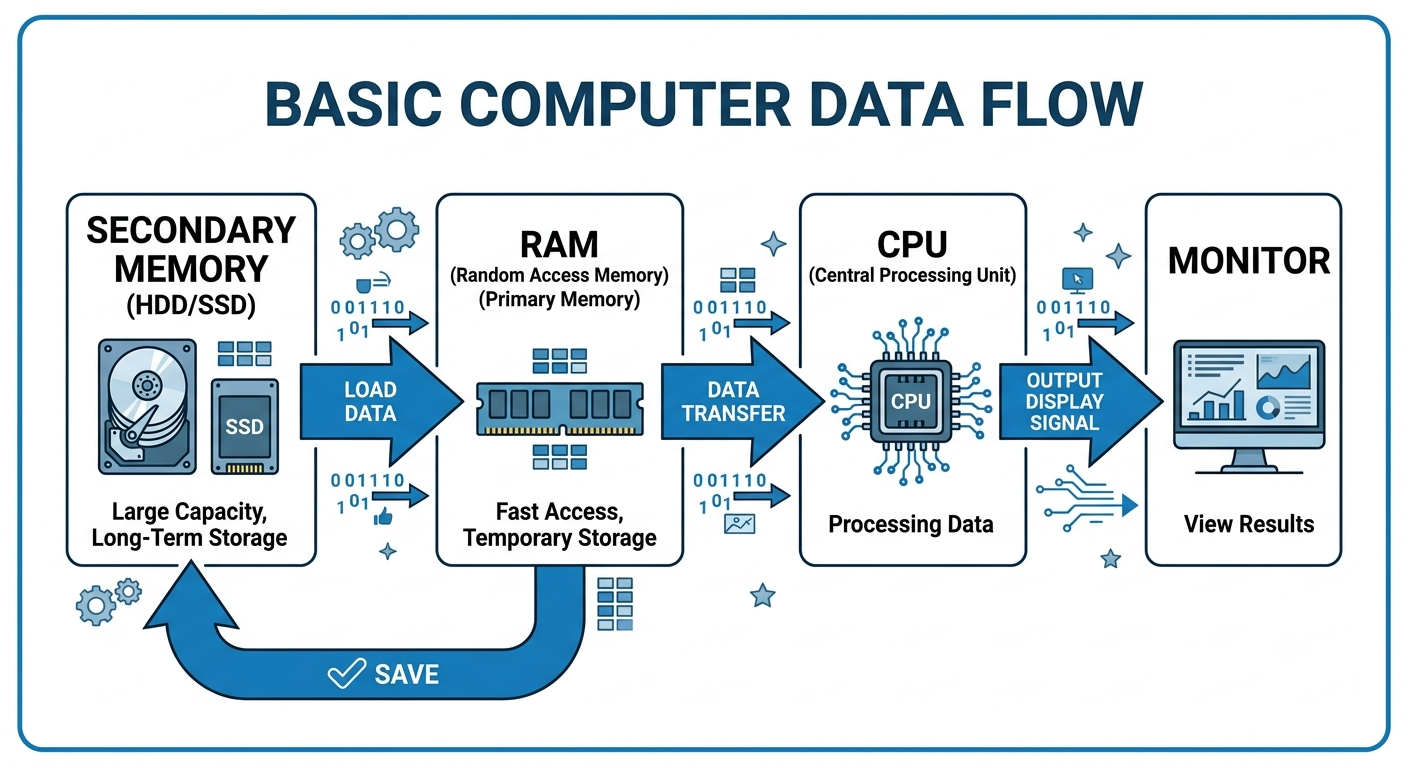
Chapter 1: Introduction to Computer
NIELIT Official Syllabus – Chapter 1 Topics:
Computer & Latest IT Gadgets, Evolution of Computers & Applications, IT Gadgets and Applications, Hardware (CPU, Input Devices, Output Devices, Computer Memory & Storage), Software (Application Software, Systems Software, Utility Software, Open Source & Proprietary Software, Mobile Apps)
- Introduction of Computer
- Characteristics of Computer System
- Objectives
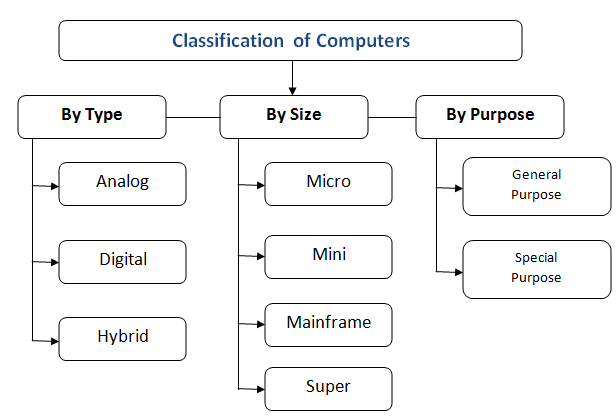
- Types of Computer
- Analog Computer
- Digital Computer
- Hybrid Computer
- Types of Digital Computer
- Mini Computer
- Mainframe Computer
- Super Computer
- Evolution of Computer
- Generation of Computer (कंप्यूटर की पीढ़ियाँ)
- IT Gadgets and Their Applications (आईटी गैजेट्स एवं उनके अनुप्रयोग)
- Basics of Hardware and Software
- Input Devices (इनपुट डिवाइस)
- Keyboard (कीबोर्ड
- Mouse
- Output Devices (आउटपुट डिवाइस)
- Monitor
- Printer (प्रिंटर)
- Types of Printer
- CPU (Central Processing Unit) – The Brain of Computer (कंप्यूटर का मस्तिष्क)
- Cache Memory (कैश मेमोरी)
- Computer Memory (कंप्यूटर मेमोरी)
- Primary Memory (प्राथमिक मेमोरी)
- Types of Primary Memory (प्राथमिक मेमोरी के प्रकार)
- Secondary Memory (द्वितीयक मेमोरी)
Introduction of Computer
A computer is an electronic device that accepts data as input, processes it according to instructions, stores it, and produces meaningful information as output. It is widely used in education, business, healthcare, banking, communication, science, and entertainment.
कंप्यूटर एक इलेक्ट्रॉनिक डिवाइस है जो इनपुट के तौर पर डेटा लेता है, निर्देशों के अनुसार उसे प्रोसेस करता है, उसे स्टोर करता है और आउटपुट के तौर पर काम की जानकारी देता है। इसका इस्तेमाल शिक्षा, बिज़नेस, हेल्थकेयर, बैंकिंग, कम्युनिकेशन, साइंस और मनोरंजन के क्षेत्रों में बड़े पैमाने पर किया जाता है।
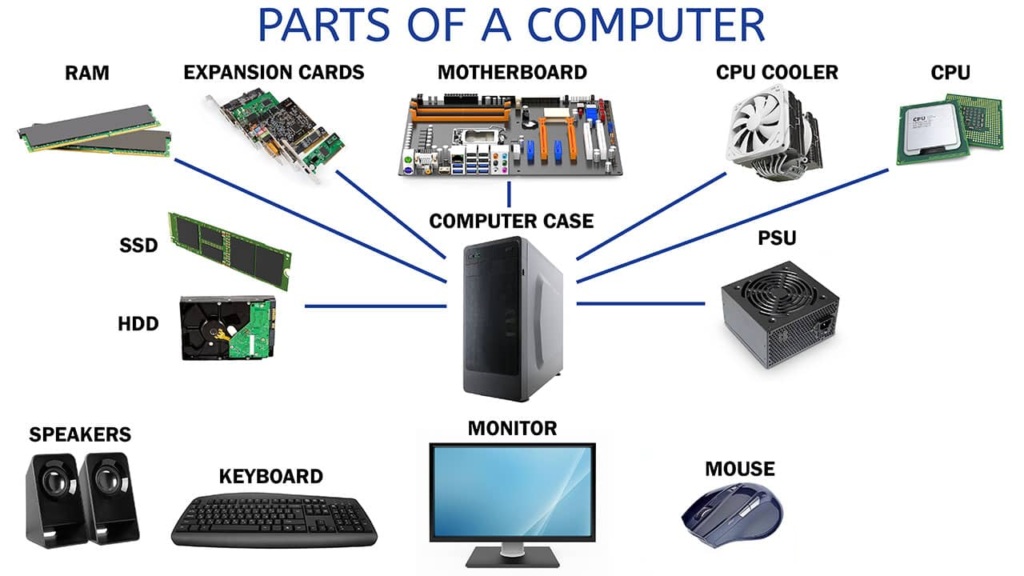
Characteristics of Computer System
A computer is an electronic device that processes raw data into meaningful information. Its core characteristics include speed, accuracy, diligence, versatility, and massive storage
Speed: Computers operate at incredible speeds, processing millions to billions of instructions per second. Speeds are measured in micro- or nanoseconds, often denoted in Gigahertz (GHz) or operations per second.
Accuracy: They execute complex mathematical and logical operations with a high degree of precision. Any errors typically stem from incorrect inputs or software bugs, a concept known as "Garbage In, Garbage Out" (GIGO).
Diligence: Unlike humans, computers do not experience fatigue, boredom, or a lack of concentration. They can perform repetitive tasks for extended periods without losing consistency or making errors.
Versatility: Computers are incredibly adaptable and can perform entirely different types of work simultaneously or sequentially, from basic document processing to heavy data analysis and graphics rendering.
Storage and Memory: They can store immense volumes of data—including text, images, and video—for long periods and retrieve them almost instantaneously.
Automation: Computers can execute programmed tasks without continuous human intervention, increasing productivity across industries from manufacturing to system administration.
Reliability: They are highly dependable and will produce consistent, exact outputs every time the same set of inputs and instructions are processed.
कंप्यूटर एक इलेक्ट्रॉनिक डिवाइस है जो रॉ डेटा को काम की जानकारी में बदलता है। इसकी मुख्य खूबियों में स्पीड, सटीकता, लगन, अलग-अलग तरह के काम करने की क्षमता और बहुत ज़्यादा स्टोरेज शामिल हैं।
1. स्पीड: कंप्यूटर बहुत तेज़ गति से काम करते हैं और हर सेकंड लाखों-करोड़ों इंस्ट्रक्शन प्रोसेस करते हैं। स्पीड को माइक्रो- या नैनोसेकंड में मापा जाता है, जिसे अक्सर गीगाहर्ट्ज़ (GHz) या ऑपरेशन्स प्रति सेकंड में दिखाया जाता है।
2. सटीकता: ये मुश्किल गणितीय और लॉजिकल काम बहुत सटीकता से करते हैं। कोई भी गलती आमतौर पर गलत इनपुट या सॉफ्टवेयर बग की वजह से होती है, जिसे "गारबेज इन, गारबेज आउट" (GIGO) कहा जाता है।
3. लगन: इंसानों के उलट, कंप्यूटर थकते नहीं हैं, न ही उन्हें बोरियत होती है और न ही उनका ध्यान भटकता है। वे बिना गलती किए या काम की क्वालिटी में कमी लाए लंबे समय तक एक जैसे काम बार-बार कर सकते हैं।
4. अलग-अलग तरह के काम करने की क्षमता: कंप्यूटर बहुत फ्लेक्सिबल होते हैं और एक ही समय में या एक के बाद एक कई तरह के अलग-अलग काम कर सकते हैं—जैसे बेसिक डॉक्यूमेंट प्रोसेसिंग से लेकर भारी डेटा एनालिसिस और ग्राफिक्स रेंडरिंग तक।
5. स्टोरेज और मेमोरी: ये बहुत बड़ी मात्रा में डेटा—जैसे टेक्स्ट, इमेज और वीडियो—को लंबे समय तक स्टोर कर सकते हैं और उन्हें लगभग तुरंत वापस पा सकते हैं।
6. ऑटोमेशन: कंप्यूटर बिना लगातार इंसानी दखल के प्रोग्राम किए गए काम कर सकते हैं, जिससे मैन्युफैक्चरिंग से लेकर सिस्टम एडमिनिस्ट्रेशन तक सभी इंडस्ट्रीज़ में प्रोडक्टिविटी बढ़ती है।
7. भरोसेमंद: ये बहुत भरोसेमंद होते हैं और हर बार एक जैसे इनपुट और इंस्ट्रक्शन प्रोसेस करने पर एक जैसा और सही आउटपुट देते हैं।
Objectives
The primary objective of a computer description isto define a system's capabilities, specifications, and architecture to users or technicians. It outlines how a machine's hardware and software process input data into useful output, ensuring seamless operation, troubleshooting, and optimal hardware selection
कंप्यूटर का मुख्य उद्देश्य यूज़र्स या टेक्नीशियन्स को सिस्टम की क्षमताओं, स्पेसिफिकेशन्स और आर्किटेक्चर के बारे में बताना है। यह बताता है कि मशीन का हार्डवेयर और सॉफ्टवेयर इनपुट डेटा को उपयोगी आउटपुट में कैसे बदलते हैं, जिससे सुचारू रूप से काम करना, समस्या का समाधान करना और सही हार्डवेयर चुनना आसान हो जाता है।
Types of Computer
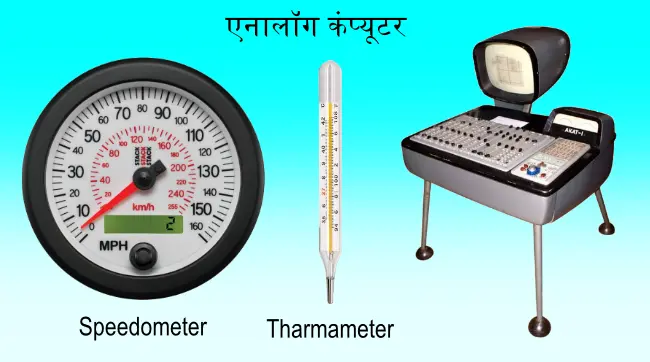
Analog Computer
An analogue computerprocesses data using continuously variable physical quantities—such as electrical voltages, mechanical gears, or fluid pressure. Rather than counting in discrete binary digits (0s and 1s) like modern machines, they model the mathematics of real-world physical systems directly.
एनालॉग कंप्यूटर लगातार बदलने वाली फिजिकल क्वांटिटीज—जैसे इलेक्ट्रिकल वोल्टेज, मैकेनिकल गियर या फ्लूइड प्रेशर—का इस्तेमाल करके डेटा प्रोसेस करते हैं। मॉडर्न मशीनों की तरह अलग-अलग बाइनरी डिजिट (0 और 1) में गिनती करने के बजाय, ये असल दुनिया के फिजिकल सिस्टम के गणित को सीधे मॉडल करते हैं।
Digital Computer
A digital computer is an electronic device that solves problems by processing information in discrete form, specifically using the binary code of 0s and 1s. Unlike analog systems that process continuous physical variations, digital machines rely on structured logic to manipulate letters, symbols, and numbers with high precision and reliability.
डिजिटल कंप्यूटर एक इलेक्ट्रॉनिक डिवाइस है जो जानकारी को अलग-अलग रूपों में प्रोसेस करके समस्याओं को हल करता है, खासकर 0 और 1 वाले बाइनरी कोड का इस्तेमाल करके। एनालॉग सिस्टम के उलट, जो लगातार होने वाले फिजिकल बदलावों को प्रोसेस करते हैं, डिजिटल मशीनें अक्षरों, सिंबल और नंबरों को बहुत सटीकता और भरोसे के साथ प्रोसेस करने के लिए स्ट्रक्चर्ड लॉजिक पर निर्भर करती हैं।

Hybrid Computer
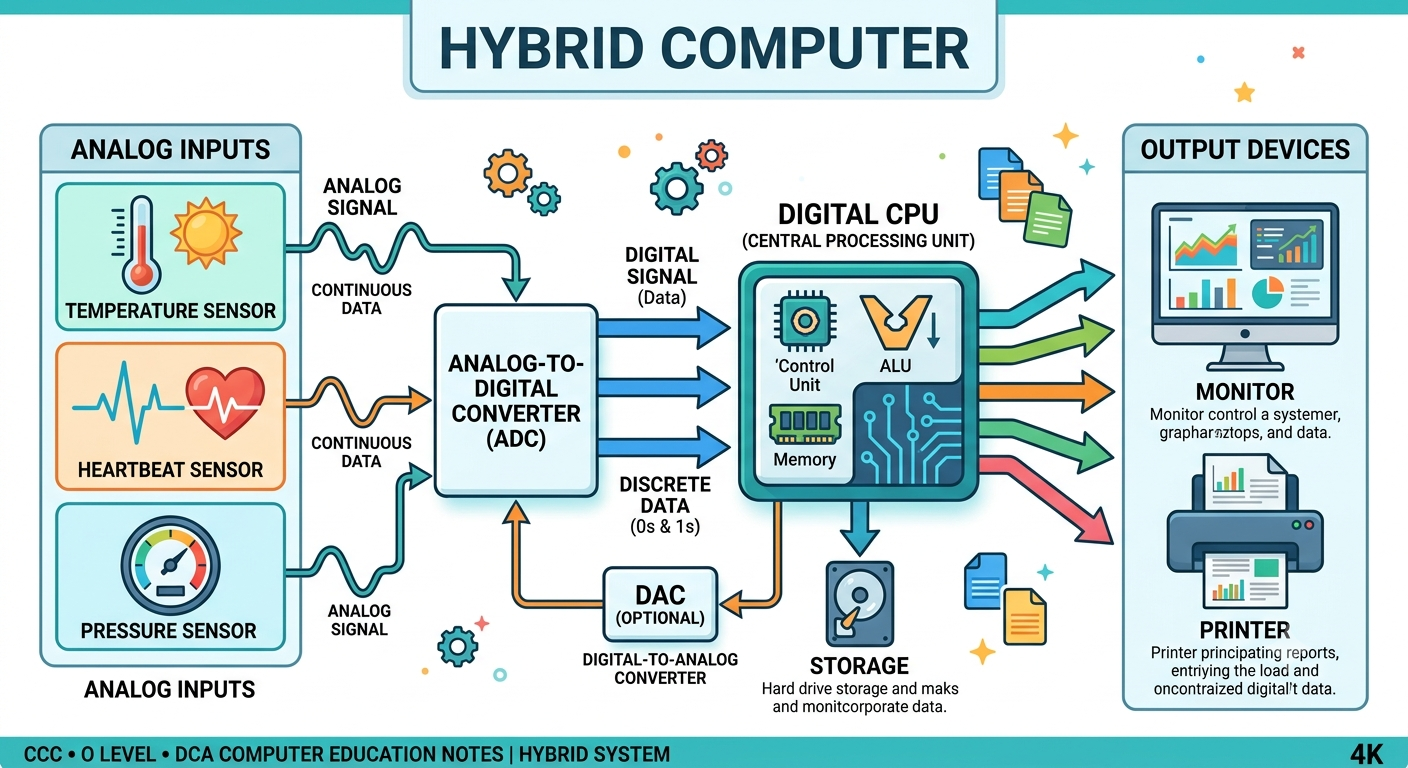
A Hybrid Computer is a type of computer that combines the features of both Analog Computer and Digital Computer. It can process both continuous (analog) and discrete (digital) data, making it suitable for applications that require high speed and accuracy.
हाइब्रिड कंप्यूटर वह कंप्यूटर है जिसमें Analog Computer और Digital Computer दोनों की विशेषताएँ होती हैं। यह लगातार बदलने वाले डेटा (Analog Data) और संख्यात्मक डेटा (Digital Data) दोनों को प्रोसेस कर सकता है। इसलिए इसका उपयोग उन स्थानों पर किया जाता है जहाँ तेज़ गति (Speed) और उच्च सटीकता (Accuracy) दोनों की आवश्यकता होती है।
What is a Hybrid Computer? (Hybrid Computer क्या है?)
Hybrid Computer दो अलग-अलग प्रकार के कंप्यूटरों का संयोजन (Combination) होता है।
- Analog Computer → वास्तविक दुनिया के लगातार बदलने वाले डेटा (जैसे तापमान, रक्तचाप, गति) को मापता है।
- Digital Computer → उस डेटा को संख्याओं (Numbers) में बदलकर गणना और विश्लेषण करता है। इसी कारण Hybrid Computer को "Best of Both Worlds" भी कहा जाता है क्योंकि इसमें Analog Computer की गति और Digital Computer की सटीकता दोनों होती हैं।
Example:-
Hospital
जब डॉक्टर मरीज का ECG करते हैं—
- मशीन पहले Heart Beat को Analog Signal के रूप में प्राप्त करती है।
- फिर उसे Digital Signal में बदलती है।
- Computer उसका विश्लेषण करके रिपोर्ट देता है।
इसलिए ECG Machine एक Hybrid Computer का उदाहरण है।
Petrol Pump
जब आप पेट्रोल भरवाते हैं—
- Sensor ईंधन की मात्रा मापता है (Analog)
- Computer लीटर और कीमत की गणना करता है (Digital)
यह भी Hybrid Computer का उदाहरण है।
Types of Digital Computer
1. Micro Computer (माइक्रो कंप्यूटर)
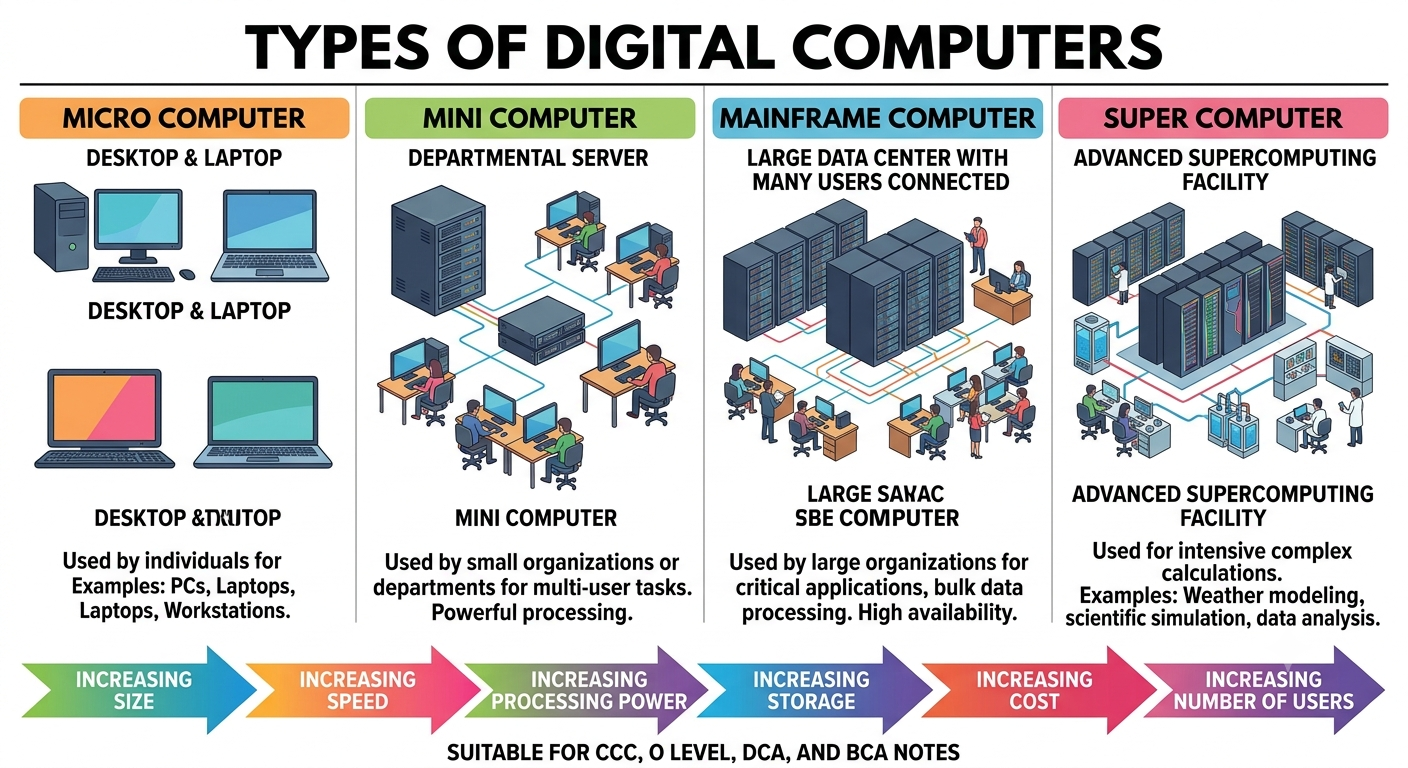
A Micro Computer is a small, affordable, single-user computer that uses a microprocessor as its CPU. It is designed for personal use.
माइक्रो कंप्यूटर एक छोटा, सस्ता और एक व्यक्ति द्वारा उपयोग किया जाने वाला कंप्यूटर है। इसमें CPU के रूप में Microprocessor का उपयोग होता है।
Features (विशेषताएँ) :-
✔ Small Size (छोटा आकार)
✔ Low Cost (कम कीमत)
✔ Single User (एक समय में एक उपयोगकर्ता)
✔ Easy to Use (उपयोग में आसान)
✔ Low Power Consumption (कम बिजली की खपत)
Mini Computer
A Mini Computer is a medium-sized computer that supports multiple users simultaneously. It is more powerful than a microcomputer but less powerful than a mainframe.
मिनी कंप्यूटर मध्यम आकार का कंप्यूटर होता है, जो एक समय में कई उपयोगकर्ताओं (Multi-user) को सेवा प्रदान कर सकता है। इसकी क्षमता माइक्रो कंप्यूटर से अधिक और मेनफ्रेम से कम होती है।
Features:-
✔ Medium Size
✔ Multi-user
✔ Faster than Micro Computer
✔ Moderate Storage
✔ Used in Small & Medium Organizations
Mainframe Computer
A Mainframe Computer is a very powerful computer designed to process huge amounts of data and support thousands of users at the same time.
मेनफ्रेम कंप्यूटर अत्यधिक शक्तिशाली कंप्यूटर होता है जो बहुत अधिक मात्रा में डेटा को प्रोसेस कर सकता है और एक साथ हजारों उपयोगकर्ताओं को सेवा प्रदान करता है।
Features:-
✔ Very Large Storage
✔ High Speed
✔ High Reliability
✔ Supports Thousands of Users
✔ 24×7 Continuous Operation
Super Computer
A Super Computer is the world's fastest and most powerful computer. It is used for solving highly complex scientific and engineering problems.
सुपर कंप्यूटर दुनिया का सबसे तेज़ और सबसे शक्तिशाली कंप्यूटर होता है। इसका उपयोग अत्यधिक जटिल वैज्ञानिक और इंजीनियरिंग कार्यों के लिए किया जाता है।
Features:-
✔ Highest Speed
✔ Huge Memory
✔ Massive Processing Power
✔ Expensive
✔ Performs Trillions of Calculations Per Second
Evolution of Computer
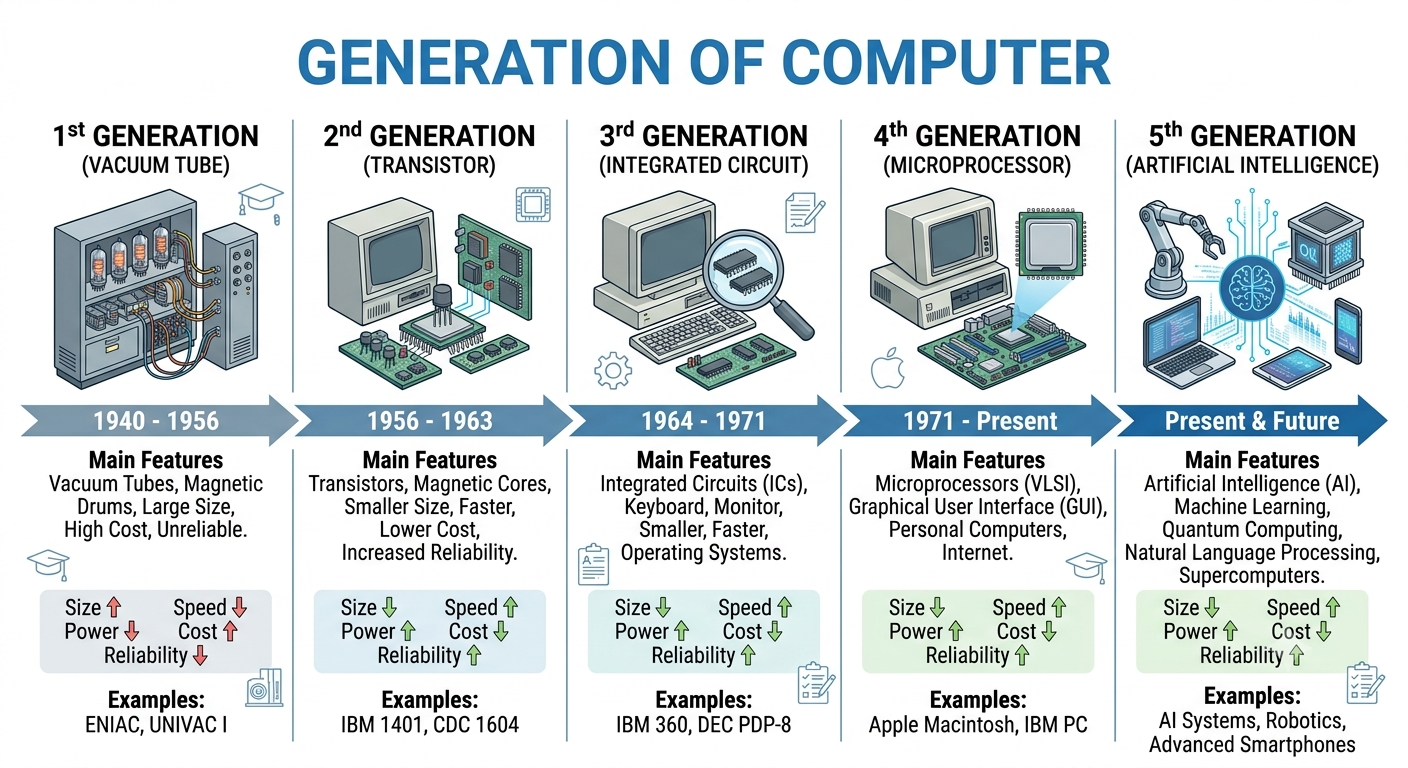
Generation of Computer (कंप्यूटर की पीढ़ियाँ)
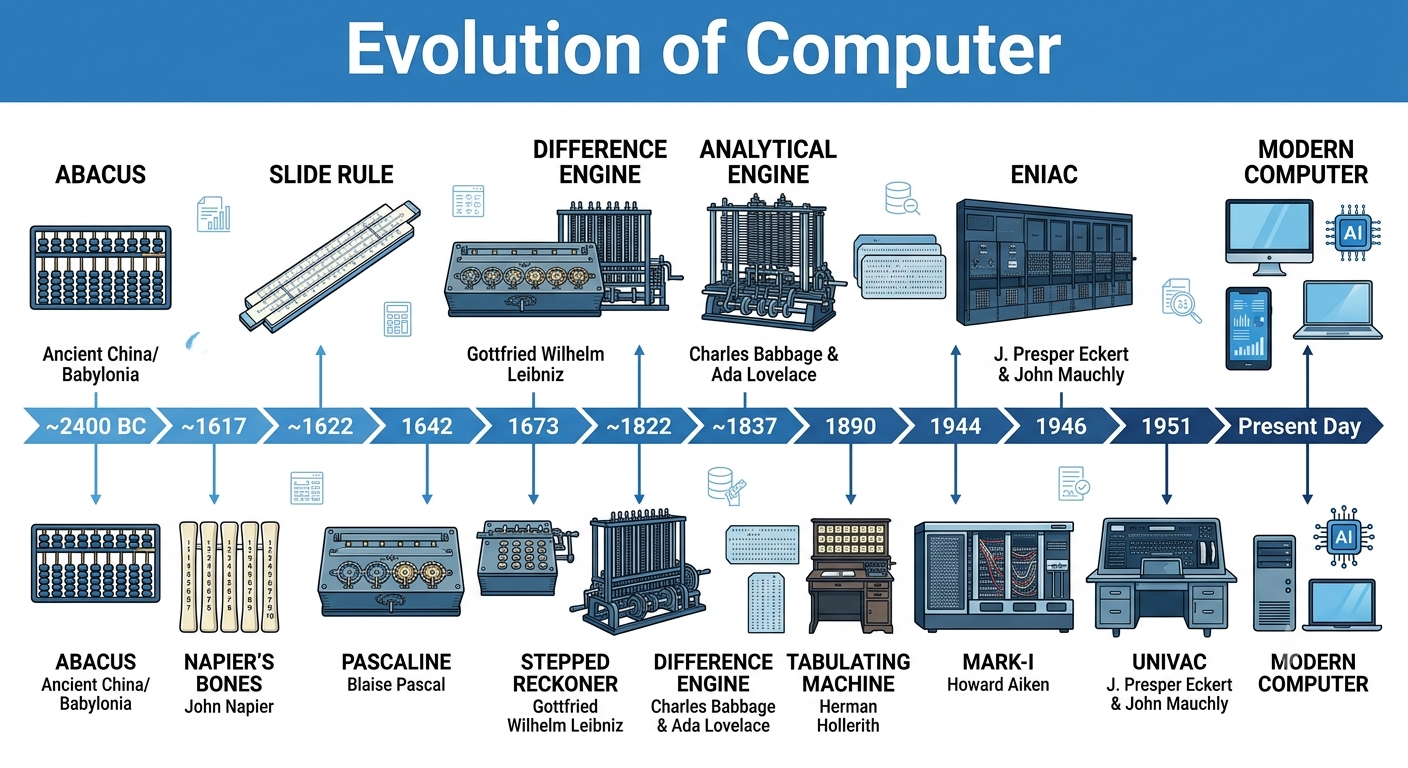
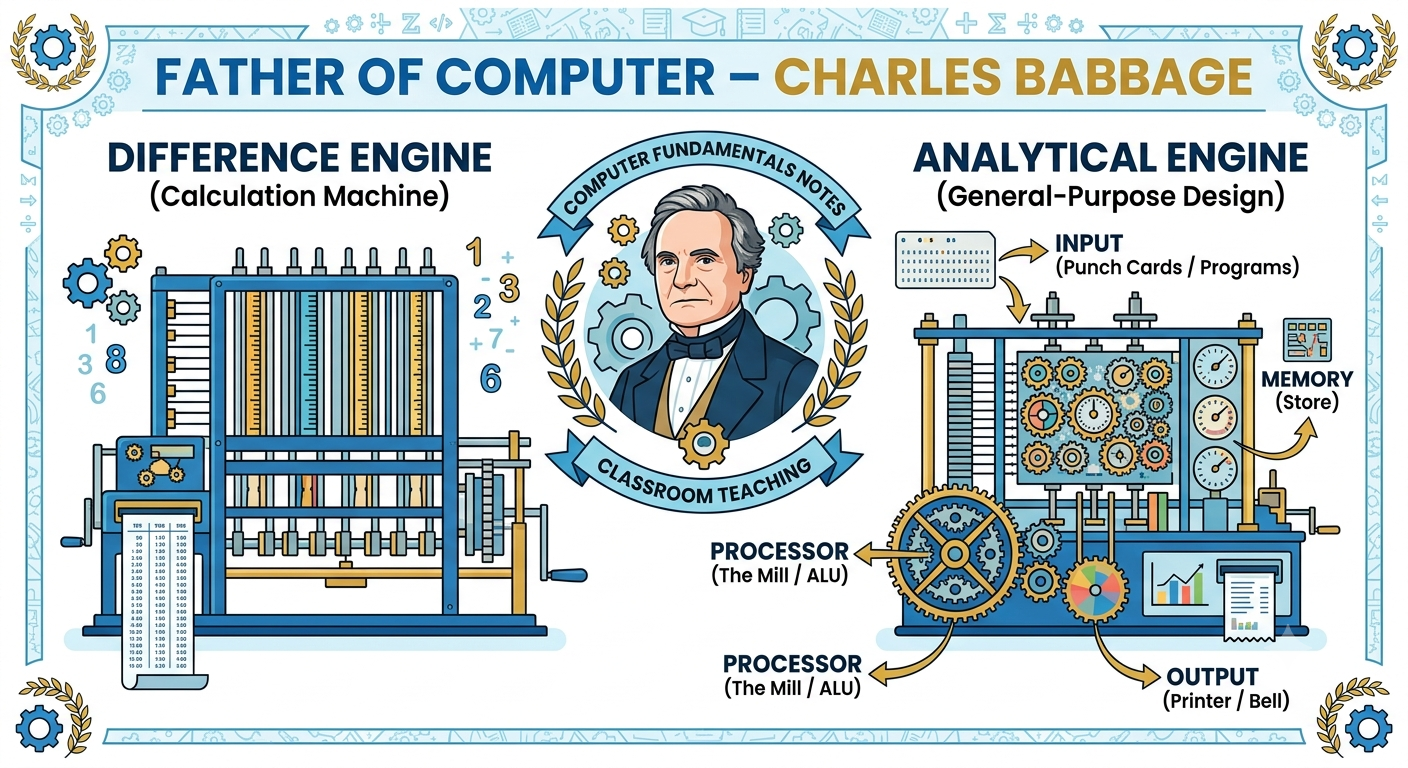
Computer Generation refers to the stages of development of computers based on the technology used in their hardware. As technology improved, computers became smaller, faster, cheaper, more reliable, and more powerful.
कंप्यूटर की पीढ़ियाँ (Generation of Computer) से तात्पर्य कंप्यूटर के विकास के उन चरणों से है, जिनमें नई तकनीक (Technology) के उपयोग से कंप्यूटर अधिक तेज़, छोटे, सस्ते, विश्वसनीय और शक्तिशाली बनते गए।
👉 सरल शब्दों में:
जब भी कंप्यूटर बनाने की तकनीक में बड़ा बदलाव हुआ, उसे नई पीढ़ी (Generation) कहा गया।
IT Gadgets and Their Applications (आईटी गैजेट्स एवं उनके अनुप्रयोग)
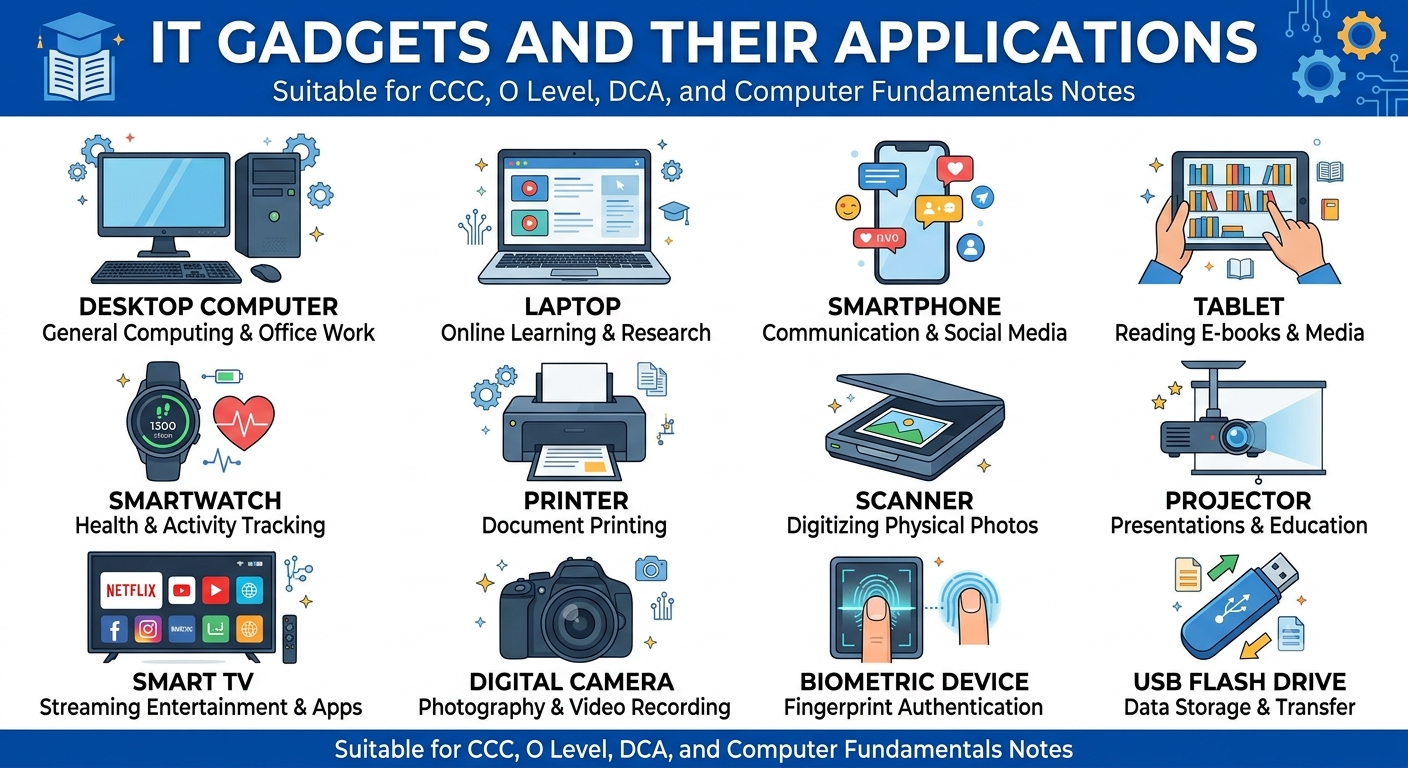
IT Gadgets are modern electronic devices that use Information Technology (IT) to process, store, communicate, and manage data. These gadgets make our daily life easier, faster, and more efficient.
आईटी गैजेट्स (IT Gadgets) ऐसे आधुनिक इलेक्ट्रॉनिक उपकरण हैं जो Information Technology (IT) का उपयोग करके डेटा को प्रोसेस, स्टोर, साझा (Share) और संचारित (Communicate) करते हैं। ये हमारे दैनिक जीवन, शिक्षा, व्यापार, स्वास्थ्य और मनोरंजन में महत्वपूर्ण भूमिका निभाते हैं।
सरल भाषा में:
IT Gadgets = ऐसे स्मार्ट इलेक्ट्रॉनिक उपकरण जो तकनीक की मदद से हमारे काम को आसान और तेज़ बनाते हैं।
What are IT Gadgets? (आईटी गैजेट्स क्या हैं?)
IT Gadgets वे डिवाइस हैं जो:
- डेटा को इनपुट, प्रोसेस और स्टोर करते हैं।
- इंटरनेट से जुड़ सकते हैं।
- एक-दूसरे से जानकारी साझा कर सकते हैं।
- स्मार्ट सेवाएँ प्रदान करते हैं।
Examples:
- Smartphone
- Laptop
- Tablet
- Smartwatch
- Printer
- Scanner
- Smart TV
- Digital Camera
- Projector
- Biometric Device
Basics of Hardware and Software
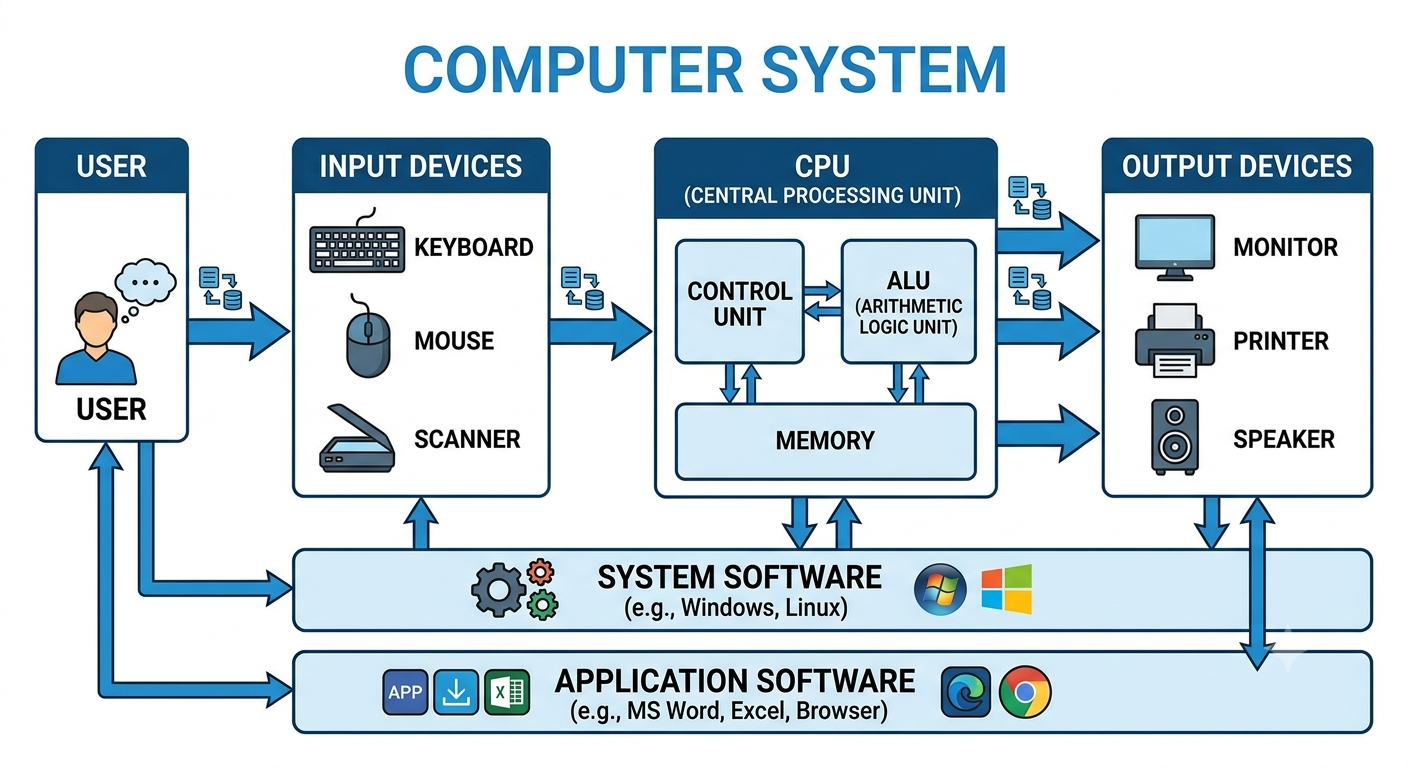
A computer system is made up of two main components:
1. Hardware – The physical parts of a computer that can be seen and touched.
2. Software – The set of programs and instructions that tell the hardware what to do.
👉 Both hardware and software work together. A computer cannot function properly without either of them.
एक कंप्यूटर सिस्टम (Computer System) मुख्य रूप से दो भागों से मिलकर बना होता है—
1. Hardware (हार्डवेयर) – कंप्यूटर के वे भाग जिन्हें हम देख और छू सकते हैं।
2. Software (सॉफ्टवेयर) – निर्देशों (Instructions) और प्रोग्रामों (Programs) का समूह, जो हार्डवेयर को
कार्य करने के लिए निर्देश देता है।
👉 हार्डवेयर और सॉफ्टवेयर दोनों एक-दूसरे के बिना अधूरे हैं।
Examples
- Keyboard
- Mouse
- Monitor
- CPU
- Printer
- Scanner
- Hard Disk
- RAM
- Motherboard
- Speakers
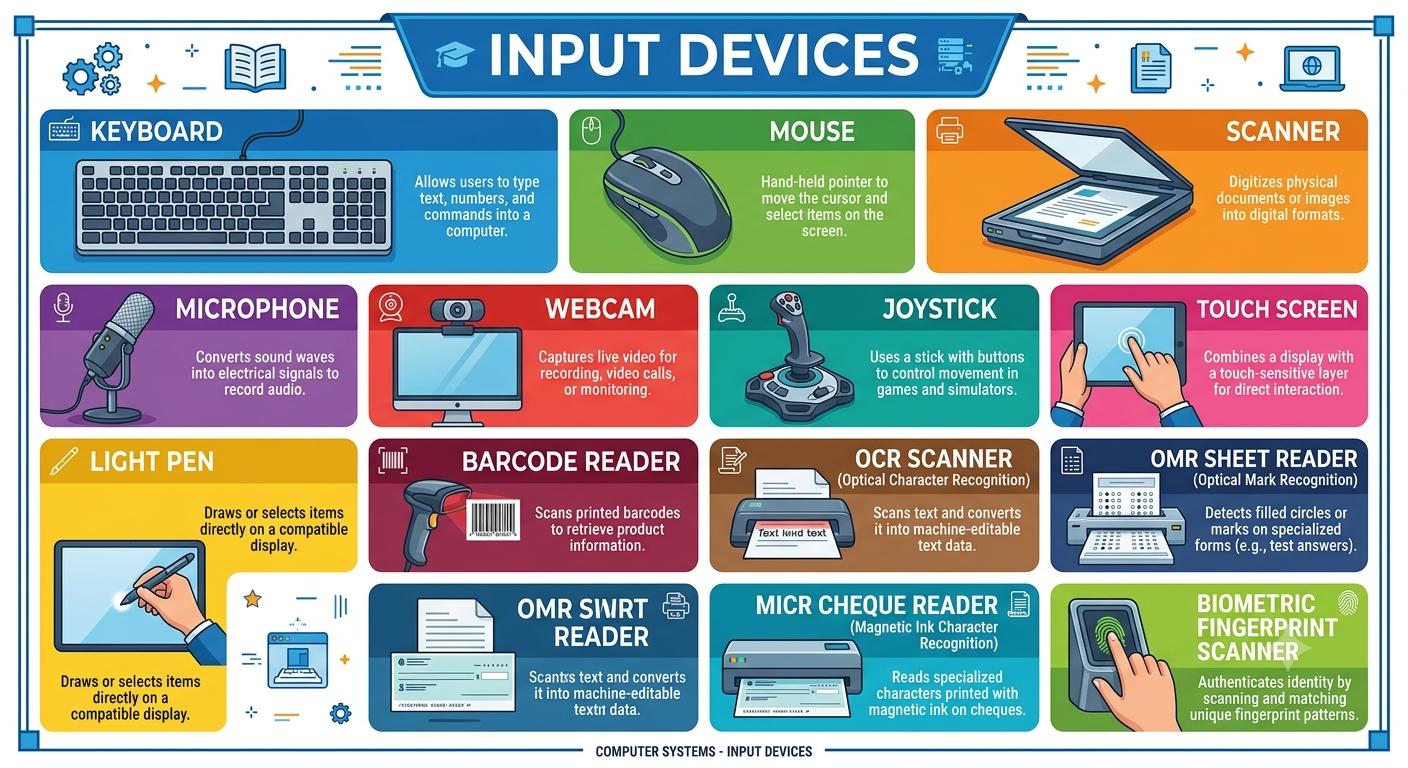
Input Devices (इनपुट डिवाइस)
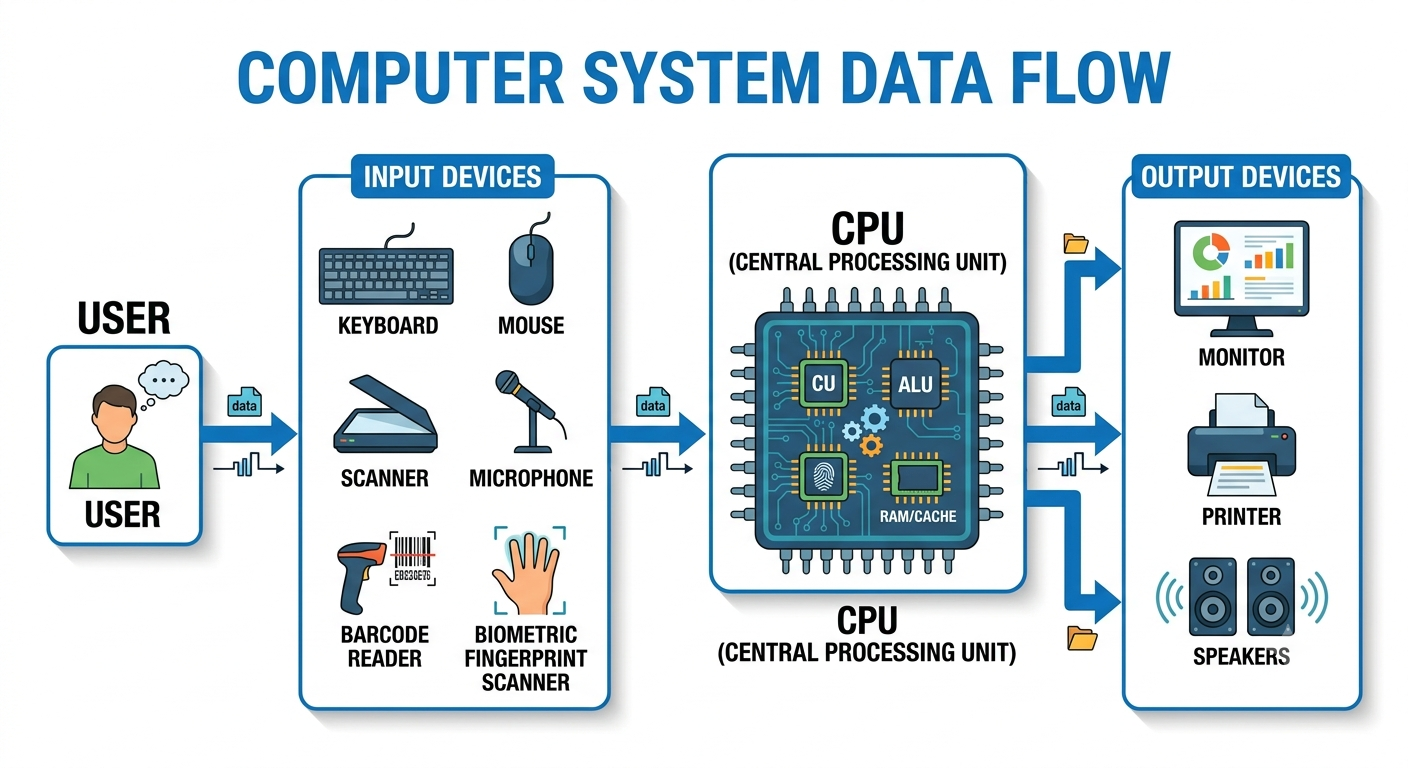
Input Devices are hardware devices that are used to enter data, instructions, or commands into a computer. These devices allow users to interact with the computer.
इनपुट डिवाइस (Input Devices) वे हार्डवेयर उपकरण हैं जिनकी सहायता से हम कंप्यूटर में डेटा, निर्देश (Instructions) या कमांड दर्ज (Enter) करते हैं।
सरल भाषा में:
Input Device = वह उपकरण जिससे हम कंप्यूटर को जानकारी देते हैं।
Keyboard (कीबोर्ड
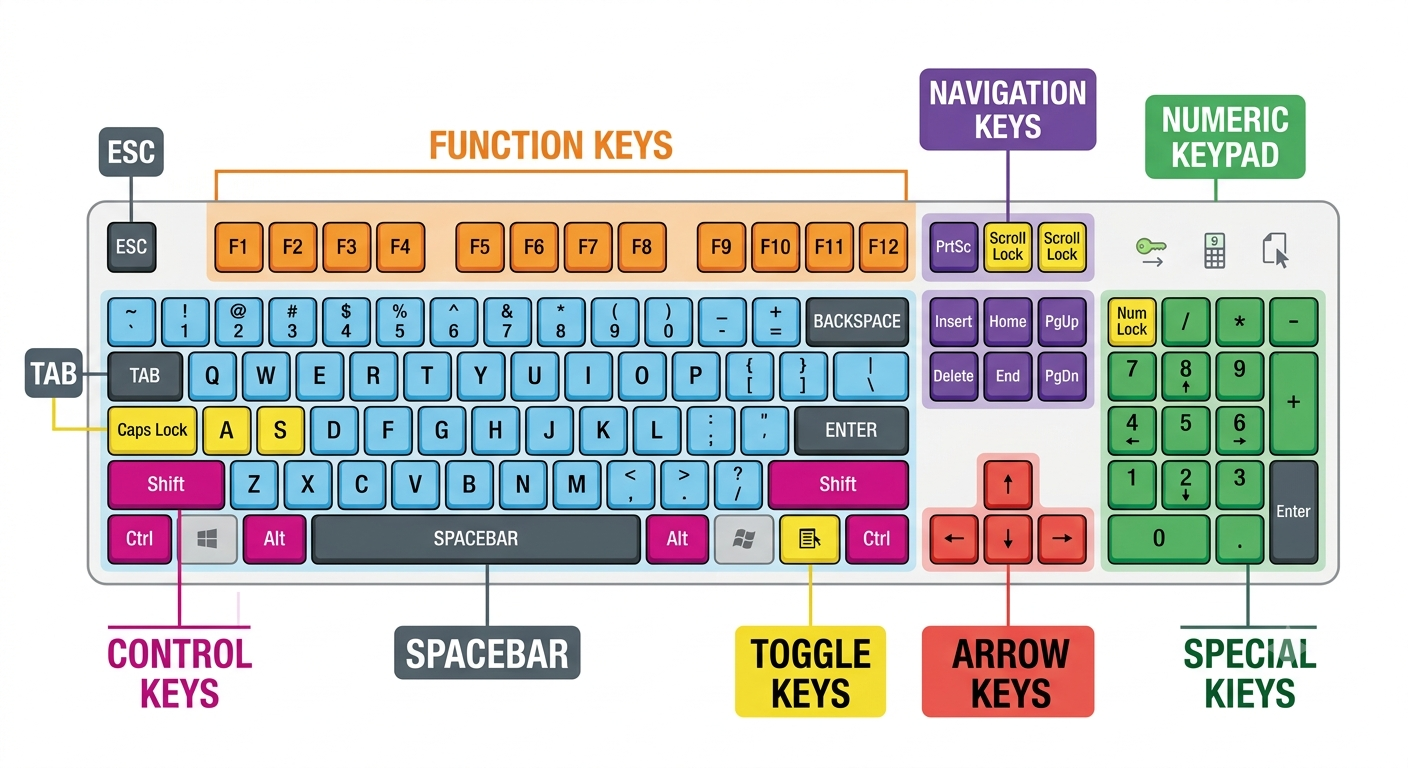
A Keyboard is the most commonly used input device of a computer. It is used to enter text, numbers, symbols, and commands into the computer. Almost every desktop, laptop, and many other digital devices use a keyboard for user interaction.
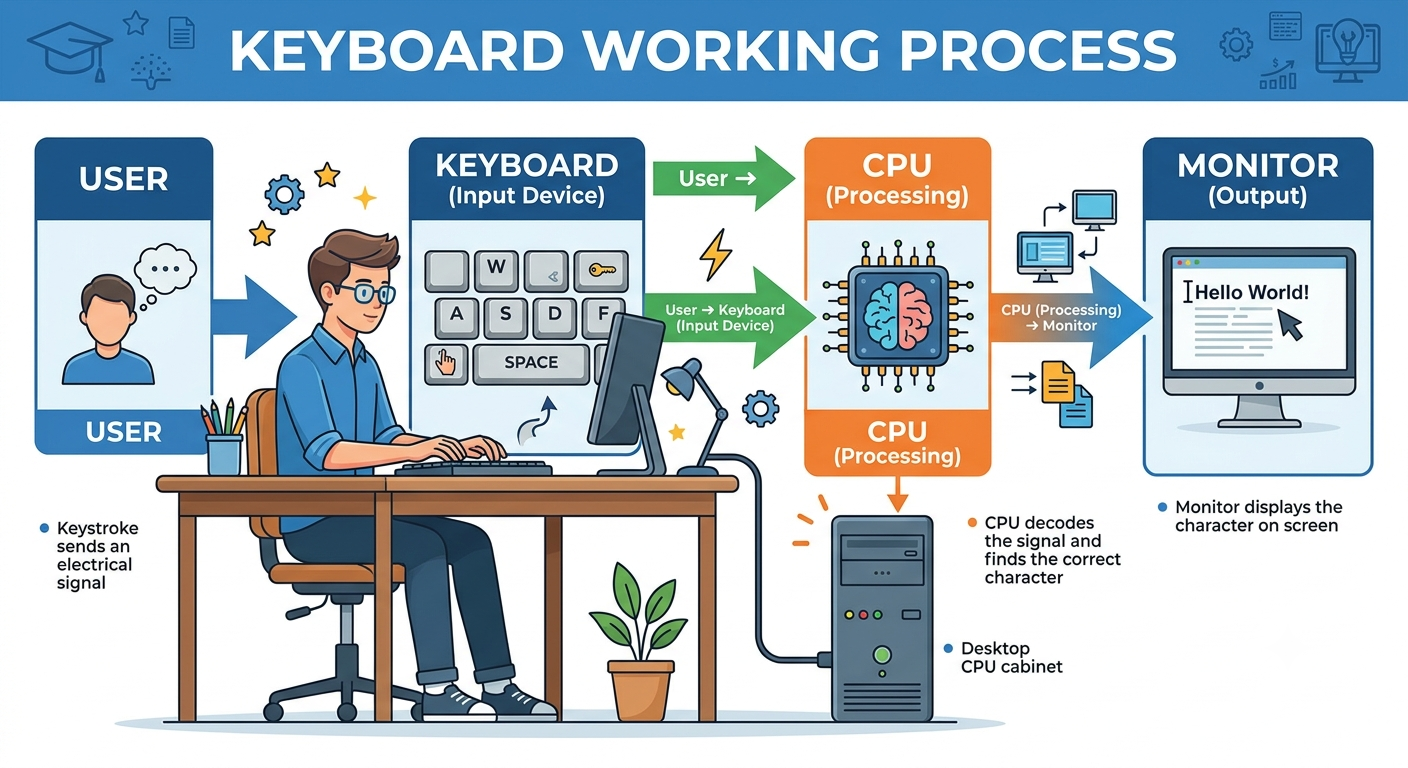
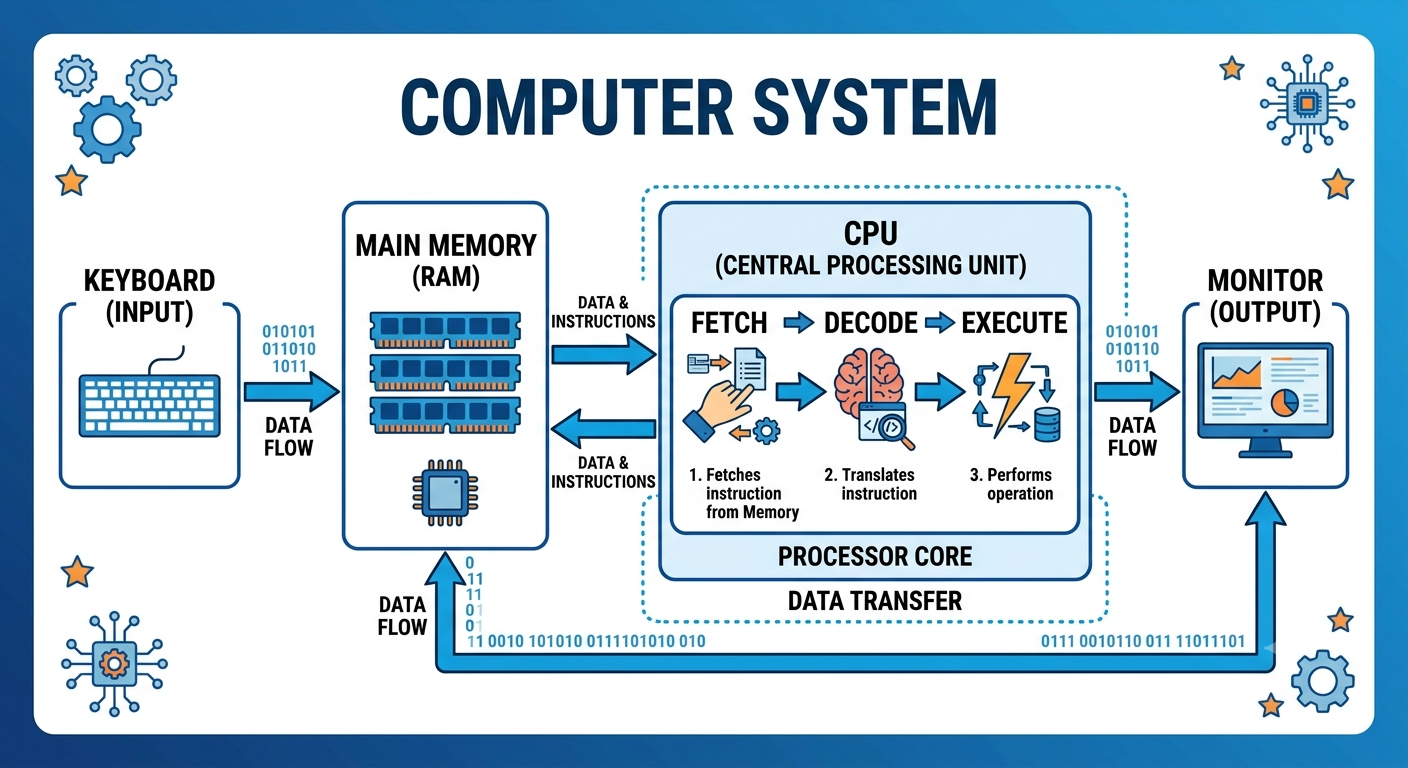
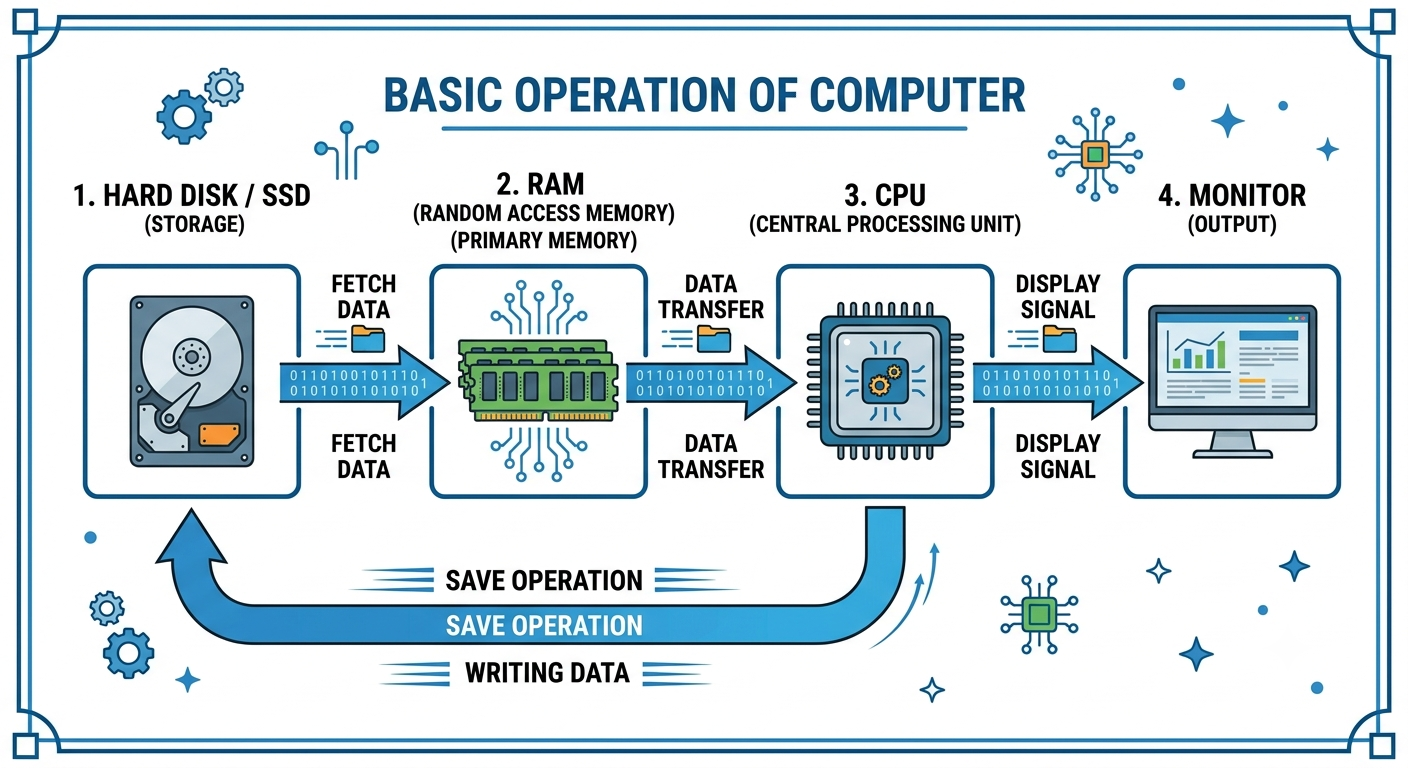
A keyboard acts as a communication bridge between the user and the computer. Whenever a key is pressed, the keyboard sends the corresponding signal to the CPU, which processes the input and displays the result on the monitor.
कीबोर्ड (Keyboard) कंप्यूटर का सबसे अधिक उपयोग किया जाने वाला इनपुट डिवाइस (Input Device) है। इसकी सहायता से हम कंप्यूटर में अक्षर (Text), संख्याएँ (Numbers), विशेष चिन्ह (Symbols) तथा कमांड (Commands) दर्ज करते हैं।
कीबोर्ड उपयोगकर्ता (User) और कंप्यूटर (Computer) के बीच संचार का माध्यम है। जब भी कोई कुंजी (Key) दबाई जाती है, तो कीबोर्ड उस जानकारी को CPU तक भेजता है। CPU उसे प्रोसेस करके परिणाम (Output) मॉनिटर पर प्रदर्शित करता है।
Important Note (महत्वपूर्ण नोट)
⭐ Keyboard is an Input Device.
⭐ The standard keyboard layout is QWERTY.
⭐ Keyboard sends data to the CPU in the form of binary signals.
⭐ Keyboard → CPU → Monitor (Input → Process → Output)
Mouse
A Mouse is one of the most commonly used input devices of a computer. It is a pointing device that allows users to control the cursor (pointer) on the computer screen. Using a mouse, users can select files, open programs, draw pictures, play games, and perform many other tasks quickly and easily.
The mouse makes interacting with a computer simple because users can point, click, drag, and drop objects instead of typing commands.
माउस (Mouse) कंप्यूटर का सबसे अधिक उपयोग किया जाने वाला इनपुट डिवाइस (Input Device) है। यह एक पॉइंटिंग डिवाइस (Pointing Device) है, जिसकी सहायता से हम कंप्यूटर स्क्रीन पर दिखाई देने वाले कर्सर (Pointer) को नियंत्रित करते हैं।
माउस की मदद से हम फाइल खोल सकते हैं, आइकन चुन सकते हैं, चित्र बना सकते हैं, गेम खेल सकते हैं तथा विभिन्न प्रोग्रामों को आसानी से संचालित कर सकते हैं।
सरल शब्दों में:
👉 Mouse वह उपकरण है जिससे हम स्क्रीन पर कर्सर को नियंत्रित करके कंप्यूटर को निर्देश देते हैं।
Inventor of Mouse (माउस का आविष्कार)
Inventor: Douglas Engelbart |
Year: 1964 |
First Demonstration: 1968 |
Types of Mouse (माउस के प्रकार)
1. Mechanical Mouse (मैकेनिकल माउस)
- Uses a rubber ball.
- Older technology.
हिन्दी: नीचे लगी रबर की गेंद से कार्य करता था।
2. Optical Mouse (ऑप्टिकल माउस)
- Uses LED light.
- Most commonly used today.
हिन्दी: LED Light और Optical Sensor की सहायता से कार्य करता है।
3. Wireless Mouse (वायरलेस माउस)
- No cable required.
- Uses Bluetooth or USB Receiver.
हिन्दी: इसमें तार नहीं होती। यह Bluetooth या USB Receiver से जुड़ता है।
Output Devices (आउटपुट डिवाइस)
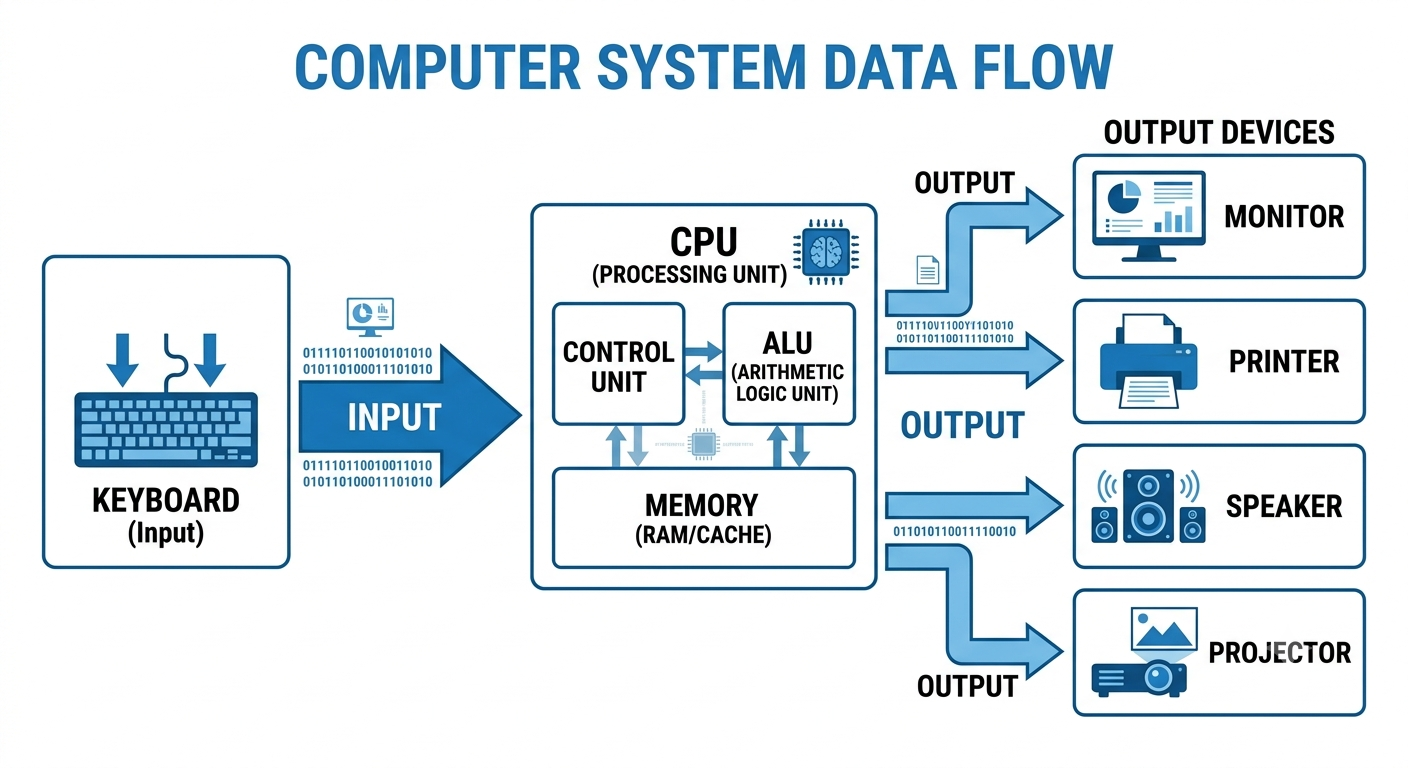
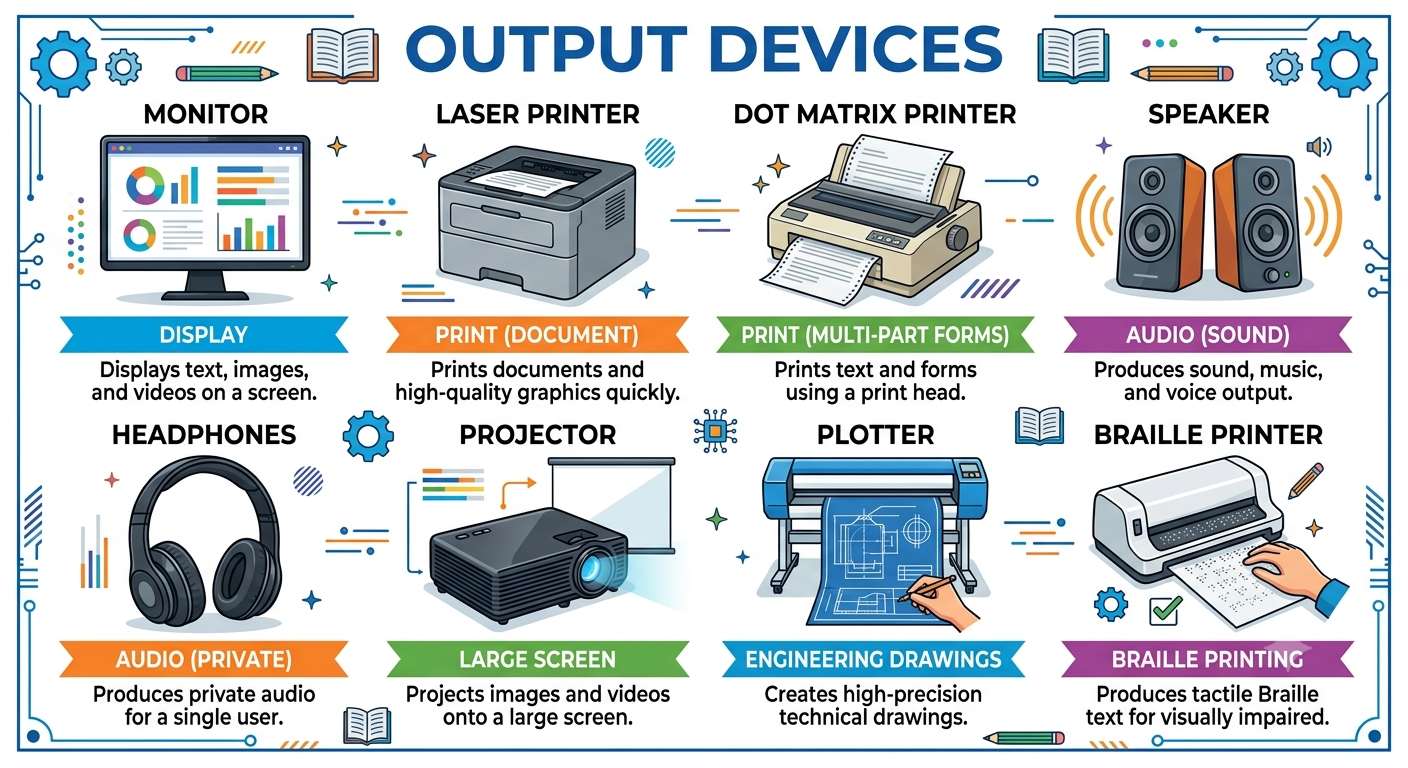
An Output Device is a hardware component of a computer that displays or presents the processed information to the user. After the CPU processes the input data, the output device converts the digital result into a human-readable form such as text, images, audio, or video.
Output devices help users understand the result of the work performed by the computer.
आउटपुट डिवाइस (Output Device) कंप्यूटर का एक हार्डवेयर उपकरण (Hardware Device) है, जो CPU द्वारा प्रोसेस किए गए डेटा (Processed Data) को उपयोगकर्ता (User) तक पढ़ने, देखने या सुनने योग्य रूप में प्रस्तुत करता है।
सरल शब्दों में,
Output Device = वह उपकरण जो कंप्यूटर द्वारा प्रोसेस किए गए परिणाम (Result) को हमें दिखाता या सुनाता है।
उदाहरण के लिए यदि आपने Keyboard से अपना नाम टाइप किया, तो CPU उसे प्रोसेस करके Monitor पर दिखाता है। यहाँ Monitor एक Output Device है।
Monitor
A Monitor is the most commonly used Output Device of a computer. It displays the processed information received from the CPU in the form of text, images, graphics, videos, and animations. Without a monitor, it becomes difficult for a user to view the results of the work performed by the computer.
A monitor is also known as a Visual Display Unit (VDU) or Visual Display Terminal (VDT) because it provides visual output to the user.
मॉनिटर (Monitor) कंप्यूटर का सबसे अधिक उपयोग किया जाने वाला आउटपुट डिवाइस (Output Device) है। यह CPU द्वारा प्रोसेस किए गए डेटा को Text (पाठ), Images (चित्र), Graphics (ग्राफिक्स), Videos (वीडियो) तथा Animations (एनिमेशन) के रूप में स्क्रीन पर प्रदर्शित करता है।
यदि मॉनिटर न हो, तो उपयोगकर्ता कंप्यूटर द्वारा दिए गए परिणाम को देख नहीं सकता।
मॉनिटर को Visual Display Unit (VDU) या Visual Display Terminal (VDT) भी कहा जाता है, क्योंकि यह उपयोगकर्ता को दृश्य (Visual) आउटपुट प्रदान करता है।
Types of Monitor (मॉनिटर के प्रकार)
1. CRT Monitor (Cathode Ray Tube)
CRT monitors use electron beams to create images on the screen.
CRT मॉनिटर में Cathode Ray Tube का उपयोग होता है।
Features
- Bulky and Heavy
- High Power Consumption
- Generates Heat
- Low Cost (Old Technology)
Advantages
- Good Color Quality
- Durable
Disadvantages
- Heavy
- Large Size
- High Electricity Consumption
2. LCD Monitor (Liquid Crystal Display)
LCD monitors use liquid crystal technology to display images.
LCD मॉनिटर Liquid Crystal Display तकनीक पर आधारित होते हैं।
Features
- Thin
- Lightweight
- Low Power Consumption
- Better Display than CRT
Advantages
- Less Heat
- Energy Efficient
- Flat Screen
3. LED Monitor (Light Emitting Diode)
LED monitors are improved versions of LCD monitors with LED backlighting.
LED मॉनिटर वास्तव में LCD मॉनिटर का उन्नत रूप हैं, जिनमें LED Backlight का उपयोग होता है।
Features
- Better Brightness
- High Contrast
- Slim Design
- Low Power Consumption
Advantages
- Excellent Picture Quality
- Long Life
- Eco-Friendly
4. OLED Monitor (Organic Light Emitting Diode)
OLED monitors use self-lighting organic pixels, providing deep blacks and vibrant colors.
OLED मॉनिटर में प्रत्येक Pixel स्वयं प्रकाश उत्पन्न करता है, जिससे गहरे काले रंग और उत्कृष्ट चित्र गुणवत्ता
मिलती है।
Applications
- Professional Editing
- Gaming
- High-End Displays
Printer (प्रिंटर)
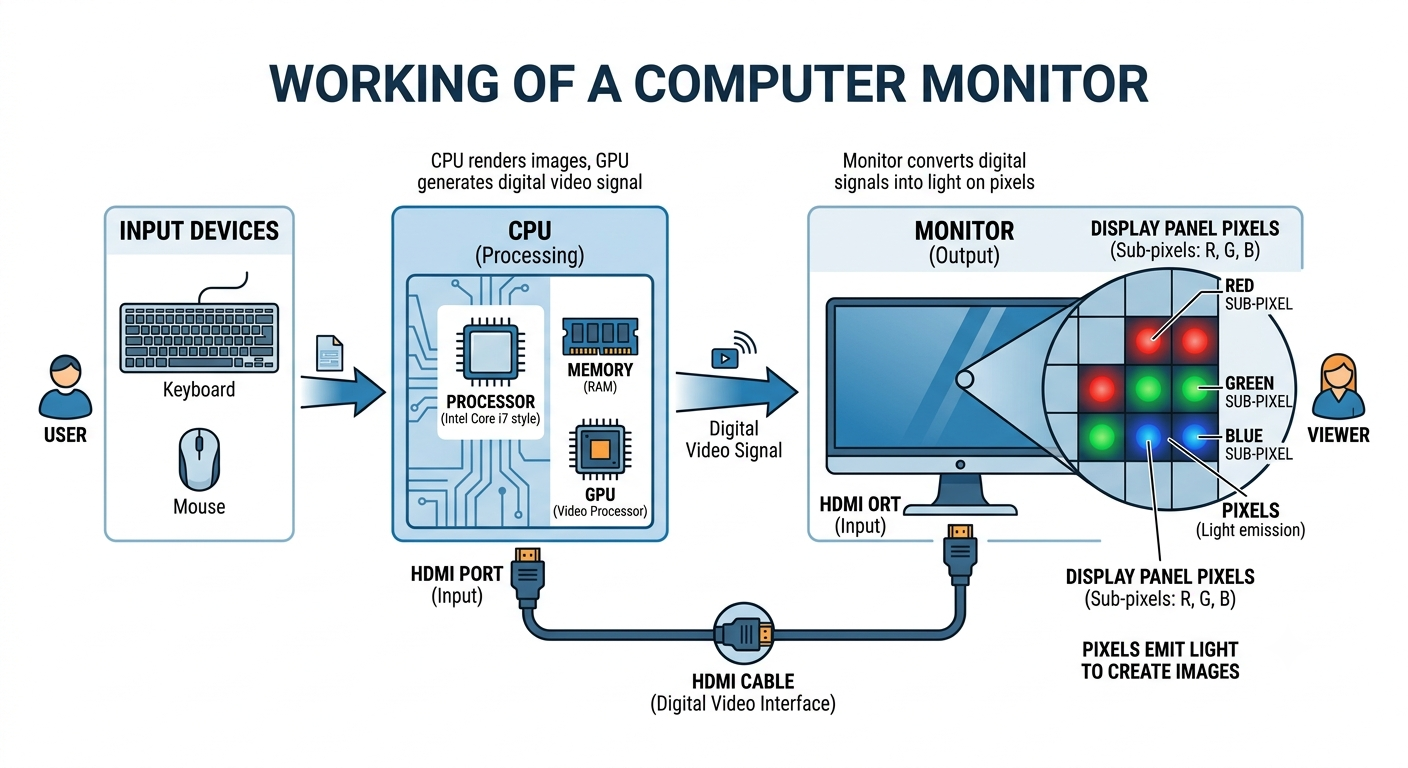
A Printer is an Output Device. It is used to print the information stored in a computer on paper.
The printed paper is called a Hard Copy.
For example, if you prepare a resume in MS Word and print it on paper, the printer converts the soft copy into a hard copy.
प्रिंटर (Printer) एक आउटपुट डिवाइस (Output Device) है।
इसका उपयोग कंप्यूटर में मौजूद जानकारी को कागज़ पर छापने (Print) के लिए किया जाता है।
कंप्यूटर में दिखाई देने वाली फ़ाइल को Soft Copy (सॉफ्ट कॉपी) कहते हैं और जब वही फ़ाइल कागज़ पर छप जाती है, तो उसे Hard Copy (हार्ड कॉपी) कहते हैं।
आसान उदाहरण:-
मान लीजिए आपने MS Word में एक आवेदन पत्र (Application) बनाया।
- कंप्यूटर में दिखाई दे रहा आवेदन = Soft Copy
- वही आवेदन Printer से कागज़ पर निकल गया = Hard Copy
👉 इसलिए कहा जाता है—
Printer converts Soft Copy into Hard Copy.
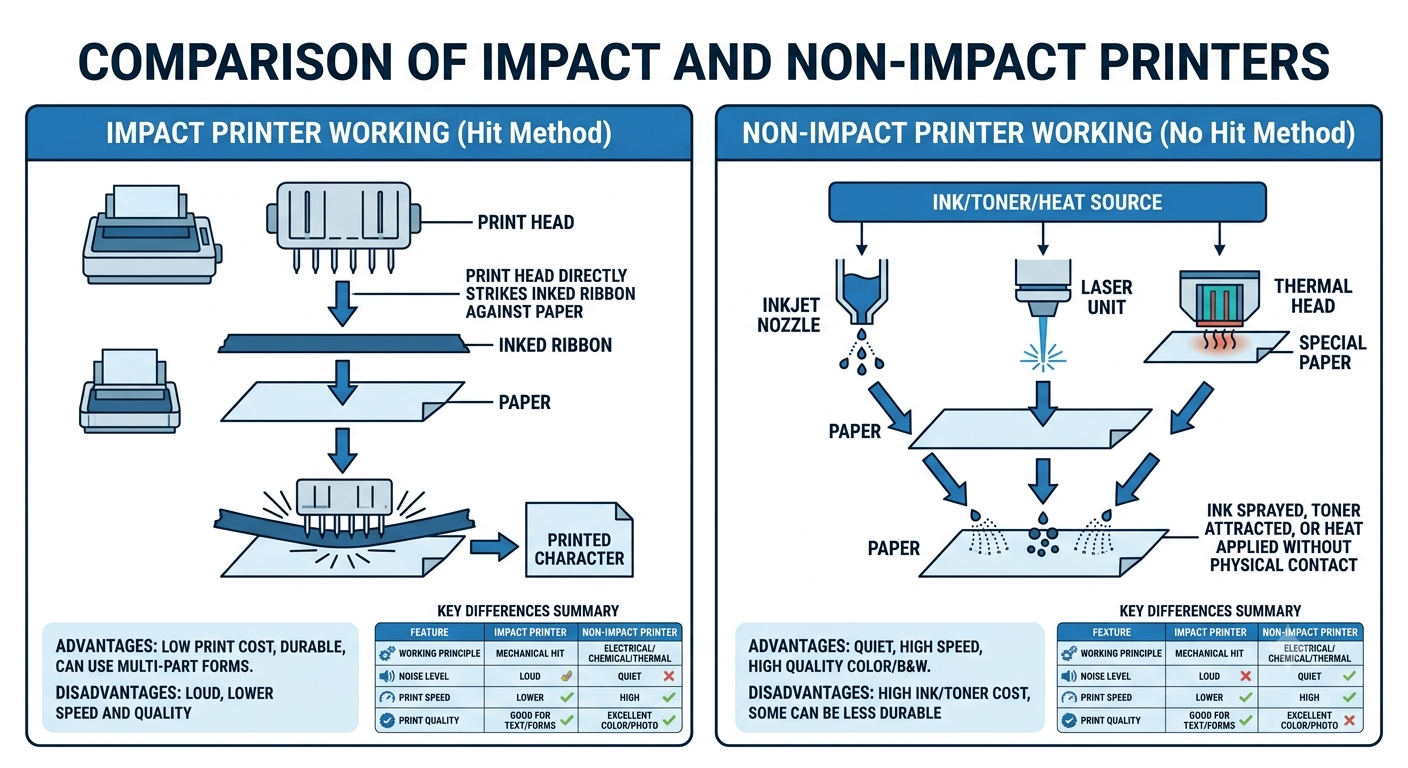
Types of Printer
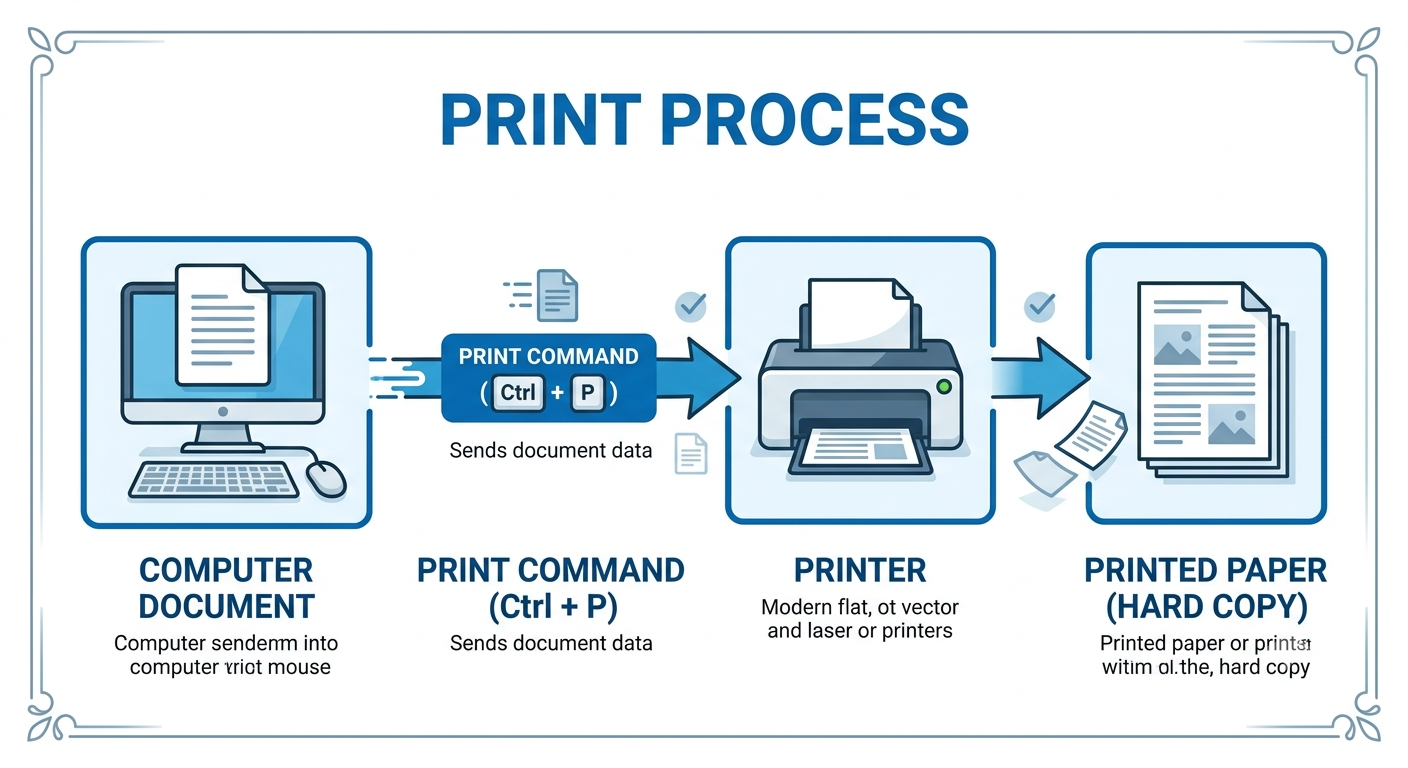
1. Impact Printer (इम्पैक्ट प्रिंटर)
An Impact Printer prints by striking (hitting) an ink ribbon against the paper, just like a
traditional typewriter.
Impact Printer वह प्रिंटर है जो Ribbon (रिबन) पर ज़ोर से प्रहार (Hit) करके अक्षरों को कागज़ पर छापता
है।
👉 यह पुराने Typewriter की तरह काम करता है।
उदाहरण:-
जैसे पुराने Typewriter में बटन दबाने पर धातु का अक्षर रिबन पर लगता था और कागज़ पर छप जाता था,
ठीक उसी प्रकार Impact Printer भी कार्य करता है।
2. Non-Impact Printer (नॉन-इम्पैक्ट प्रिंटर)
A Non-Impact Printer prints without physically touching the paper. It uses Ink, Toner, or
Heat.
Non-Impact Printer कागज़ पर प्रहार (Hit) नहीं करता।
यह Ink, Toner या Heat की सहायता से प्रिंट करता है।
इसलिए इसकी प्रिंटिंग शांत (Silent) और अधिक साफ़ होती है।
CPU (Central Processing Unit) – The Brain of Computer (कंप्यूटर का मस्तिष्क)
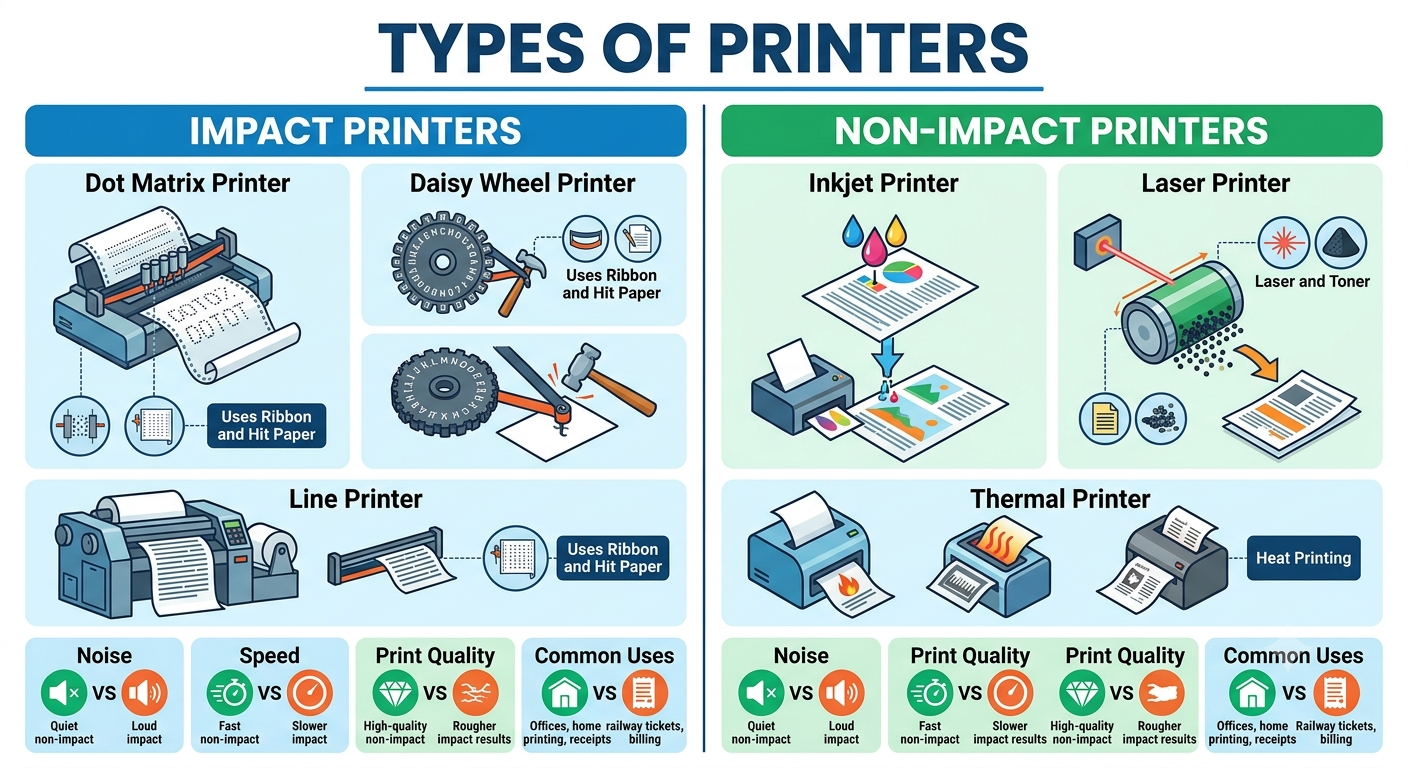
The CPU (Central Processing Unit) is the most important part of a computer. It performs all calculations, processes data, and controls every operation of the computer.
CPU is called the Brain of the Computer because it makes decisions, executes instructions, and manages all hardware and software components.
Without a CPU, a computer cannot work.
CPU (Central Processing Unit) कंप्यूटर का सबसे महत्वपूर्ण भाग है। यह सभी प्रकार की गणनाएँ (Calculations), डेटा प्रोसेसिंग (Processing) और कंप्यूटर के सभी कार्यों को नियंत्रित (Control) करता है।
CPU को कंप्यूटर का मस्तिष्क (Brain of Computer) कहा जाता है, क्योंकि यह निर्णय लेता है, निर्देशों को समझता है और सभी हार्डवेयर तथा सॉफ्टवेयर को नियंत्रित करता है।
👉 CPU के बिना कंप्यूटर काम नहीं कर सकता।
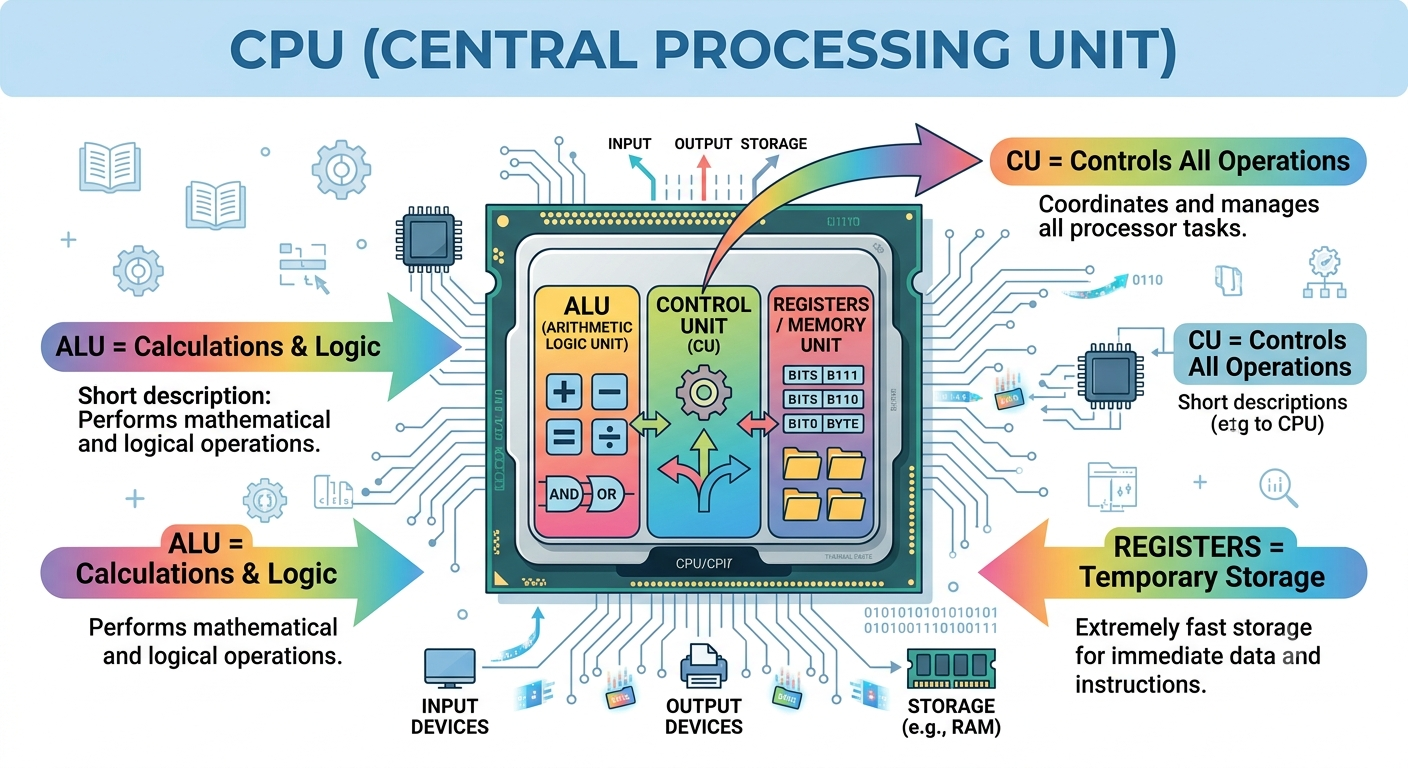
Main Components of CPU (CPU के मुख्य भाग)
CPU के तीन मुख्य भाग होते हैं—
- ALU (Arithmetic Logic Unit)
- CU (Control Unit)
- Memory Unit / Registers
ALU (Arithmetic Logic Unit)
ALU performs all arithmetic and logical operations.
ALU सभी गणितीय (Arithmetic) तथा तार्किक (Logical) कार्य करता है।
Arithmetic Operations
- Addition (+)
- Subtraction (−)
- Multiplication (×)
- Division (÷)
Logical Operations
- Greater Than (>)
- Less Than (<)
- Equal To (=)
- AND
- OR
- NOT
उदाहरण
यदि आप लिखते हैं— 15 + 10
तो जोड़ने का कार्य ALU करता है।
यदि पूछा जाए— 50 > 20 ?
तो निर्णय भी ALU लेता है।
CU (Control Unit)
The Control Unit controls and coordinates all activities of the computer.
Control Unit पूरे कंप्यूटर के सभी भागों को नियंत्रित (Control) करती है।
यह बताती है कि—
- कब डेटा लेना है।
- कहाँ भेजना है।
- कौन-सा कार्य पहले करना है।
👉 Control Unit स्वयं कोई गणना नहीं करती।
उदाहरण
यदि ALU एक Worker है,
तो Control Unit उसका Manager है।
Memory Unit (Registers)
The Memory Unit stores instructions and data temporarily while processing.
Memory Unit प्रोसेसिंग के दौरान डेटा और निर्देशों को कुछ समय के लिए सुरक्षित रखती है।
Cache Memory (कैश मेमोरी)
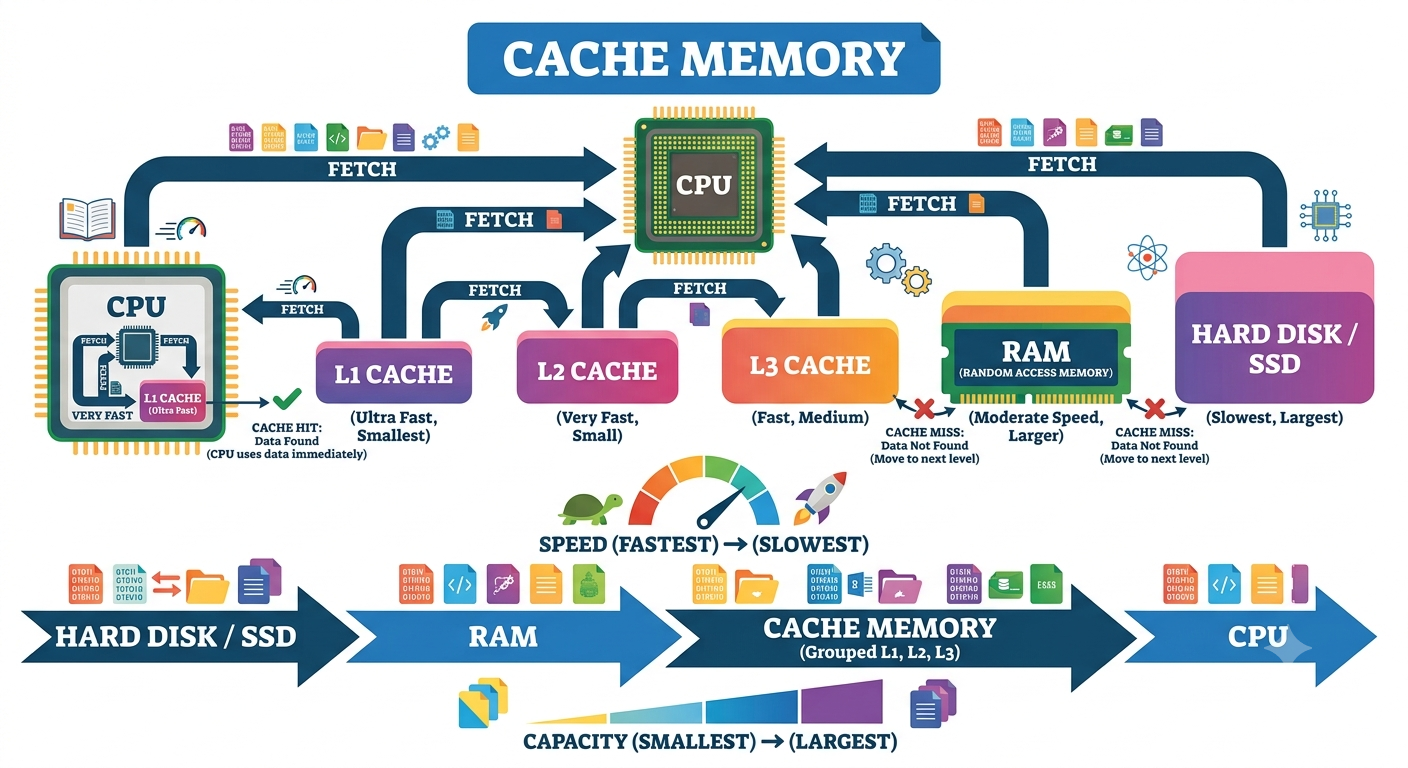
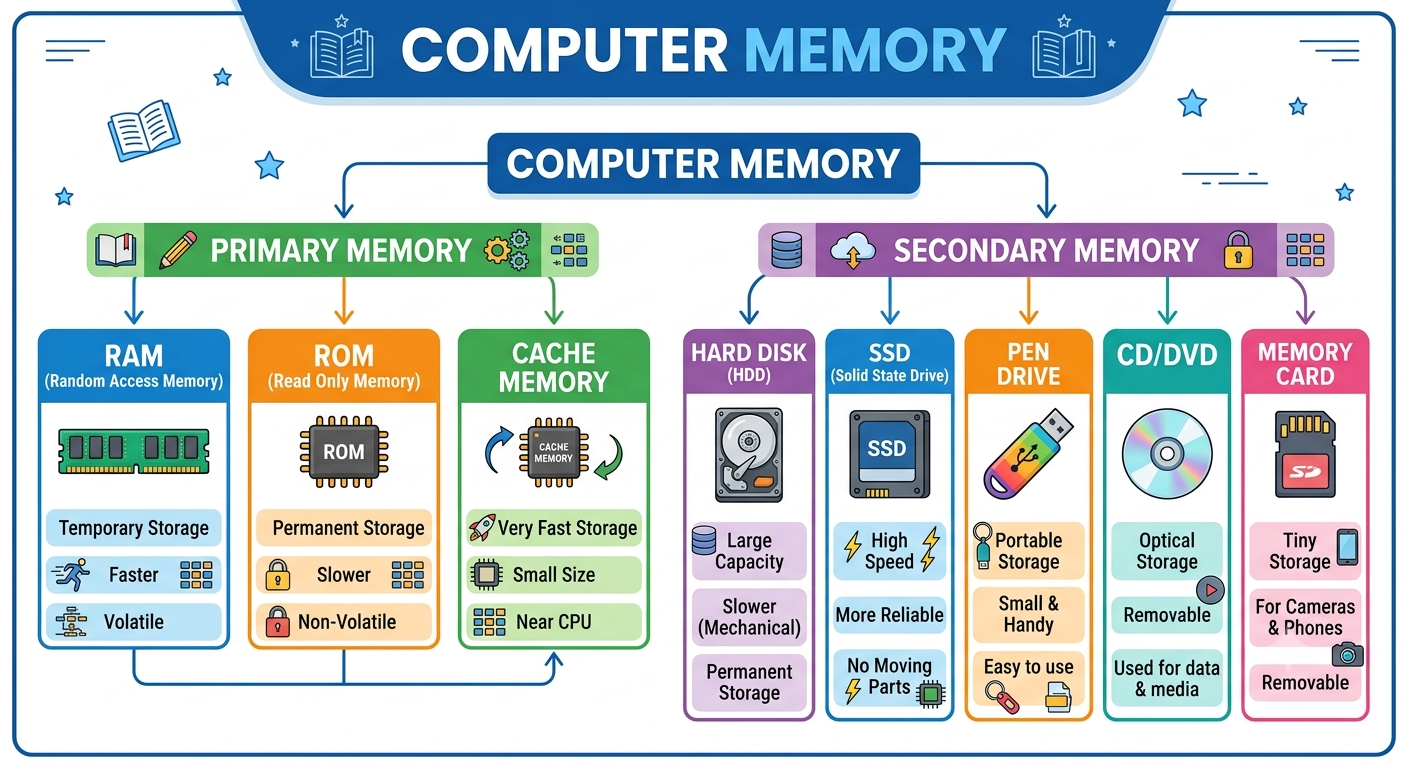
Cache Memory is a small, very fast memory located inside or very close to the CPU. It stores the most frequently used data and instructions so that the CPU can access them quickly.
Its main purpose is to increase the speed of the computer.
Cache Memory (कैश मेमोरी) एक छोटी लेकिन बहुत तेज़ (Very Fast) मेमोरी होती है, जो CPU के अंदर या उसके बहुत पास होती है।
यह उन डेटा (Data) और निर्देशों (Instructions) को कुछ समय के लिए अपने पास रखती है, जिनकी CPU को बार-बार आवश्यकता होती है।
👉 Cache Memory का मुख्य कार्य CPU की गति (Speed) बढ़ाना है।
Computer Memory (कंप्यूटर मेमोरी)
Computer Memory is a storage area where a computer stores data, instructions, and results. Whenever we use a computer, all information is stored in memory either temporarily or permanently.
Without memory, a computer cannot remember anything or perform any task.
Computer Memory (कंप्यूटर मेमोरी) वह स्थान (Storage Area) है जहाँ कंप्यूटर डेटा (Data), निर्देश (Instructions) और परिणाम (Results) को सुरक्षित (Store) रखता है।
जब भी हम कंप्यूटर पर कोई काम करते हैं, तो उसकी जानकारी किसी न किसी प्रकार की मेमोरी में सेव होती है।
👉 Memory के बिना Computer कुछ भी याद नहीं रख सकता।
Primary Memory (प्राथमिक मेमोरी)
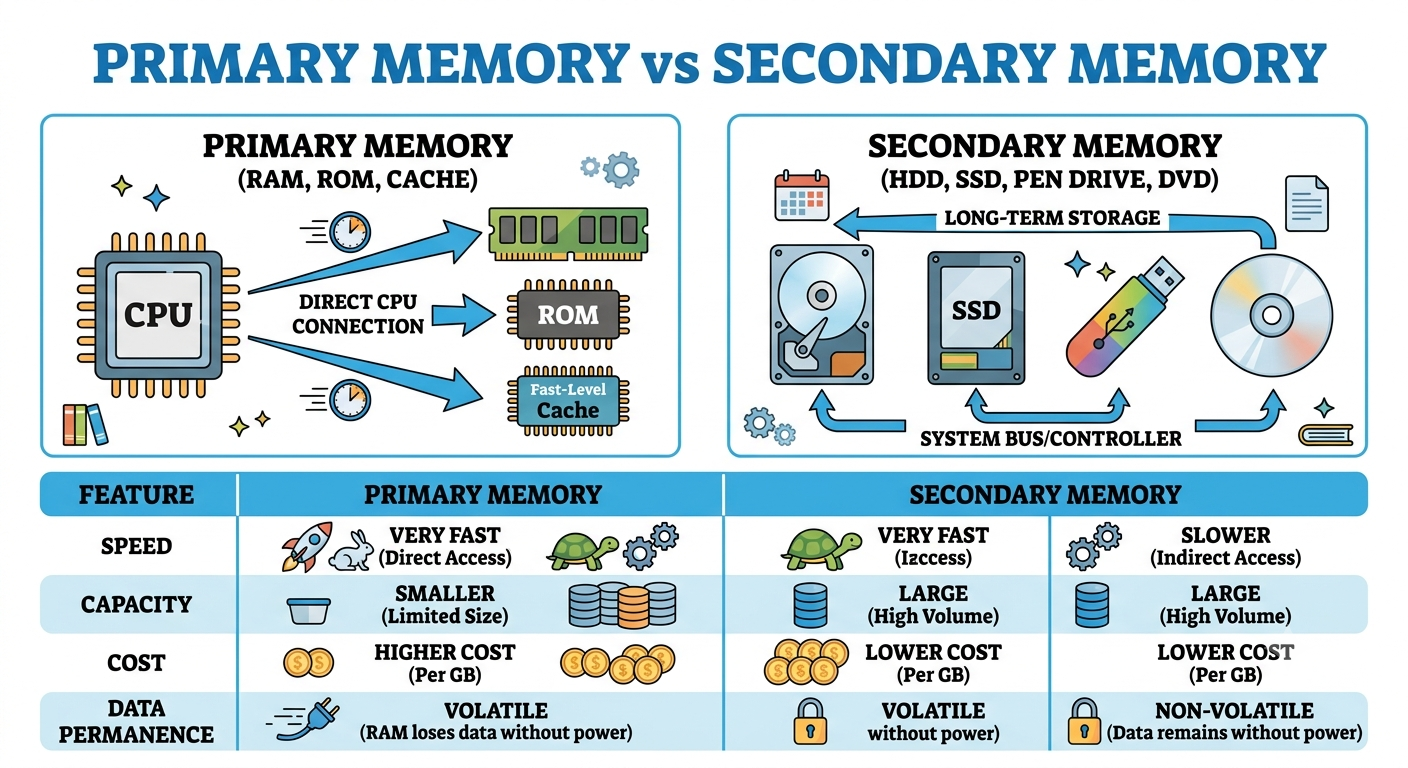
Primary Memory is the main memory of a computer. It is directly connected to the CPU and stores the data and instructions that the CPU needs immediately.
Without Primary Memory, the CPU cannot process data efficiently.
Primary Memory (प्राथमिक मेमोरी) कंप्यूटर की मुख्य मेमोरी (Main Memory) होती है। यह सीधे CPU से जुड़ी होती है और CPU को तुरंत आवश्यक डेटा (Data) तथा निर्देश (Instructions) उपलब्ध कराती है।
👉 Primary Memory के बिना CPU ठीक से कार्य नहीं कर सकता।
Advantages of Primary Memory
✅ Fast Data Access
✅ Direct Communication with CPU
✅ Improves Computer Speed
✅ Essential for Running Programs
Disadvantages of Primary Memory
❌ Small Storage Capacity
❌ More Expensive
❌ RAM loses data after power off
Applications of Primary Memory
- Running Windows
- Opening MS Word
- Playing Games
- Internet Browsing
- Video Editing
- Programming
Types of Primary Memory (प्राथमिक मेमोरी के प्रकार)
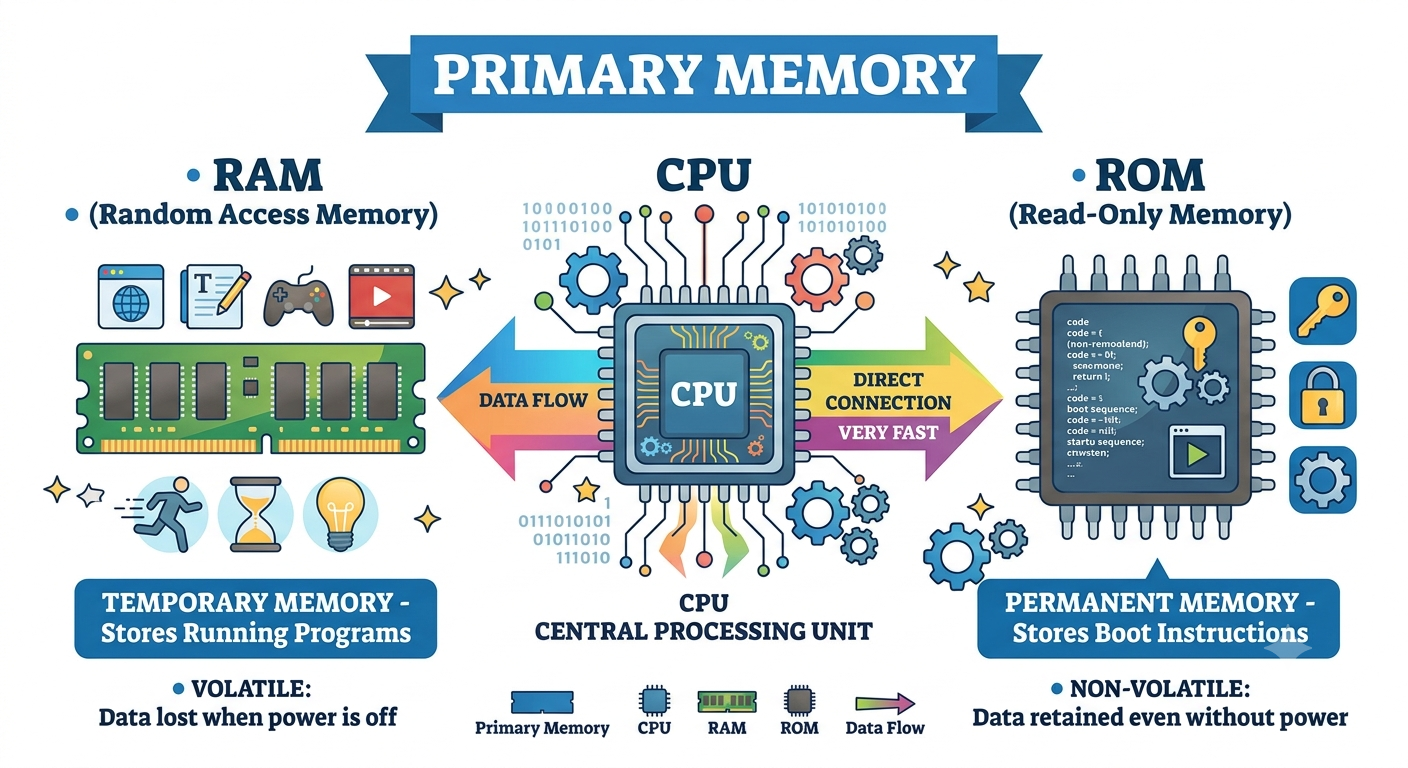
Primary Memory is the main memory of a computer. It is directly connected to the CPU and stores the data and instructions required for processing.
Primary Memory is mainly of two types:
1. RAM (Random Access Memory)
2. ROM (Read Only Memory)
Primary Memory (प्राथमिक मेमोरी) कंप्यूटर की मुख्य मेमोरी होती है। यह सीधे CPU से जुड़ी होती है और प्रोसेसिंग के लिए आवश्यक डेटा एवं निर्देशों को सुरक्षित रखती है।
Primary Memory मुख्य रूप से दो प्रकार की होती है—
1. RAM (Random Access Memory)
2. ROM (Read Only Memory)
RAM (Random Access Memory)
RAM is a temporary (volatile) memory. It stores data and programs only while the computer is running.
When the computer is turned OFF, all data stored in RAM is lost.
1. RAM एक अस्थायी (Temporary / Volatile) मेमोरी है।
2. यह केवल तब तक डेटा रखती है जब तक कंप्यूटर ON रहता है।
3. जैसे ही कंप्यूटर OFF होता है, RAM का डेटा मिट जाता है।
उदाहरण:-
आपने MS Word में Letter टाइप किया लेकिन Save नहीं किया। अगर बिजली चली गई—
👉 आपका लिखा हुआ डेटा Delete हो जाएगा।
Features of RAM
✅ Temporary Memory
✅ Read and Write Memory
✅ Fast Speed
✅ Directly Connected to CPU
Types of RAM (RAM के प्रकार)
1. SRAM (Static RAM)
- Very Fast
- Expensive
- Used in Cache Memory
- Does not need frequent refreshing
2. DRAM (Dynamic RAM)
- Slower than SRAM
- Less Expensive
- Used as Main Memory
- Needs continuous refreshing
ROM (Read Only Memory)
ROM is a permanent (non-volatile) memory. It stores important startup instructions required to boot the computer.
The data stored in ROM remains safe even after the computer is turned OFF.
ROM एक स्थायी (Permanent / Non-Volatile) मेमोरी है।
इसमें कंप्यूटर को चालू करने वाले महत्वपूर्ण निर्देश (BIOS/Firmware) पहले से सुरक्षित रहते हैं।
कंप्यूटर बंद होने पर भी ROM का डेटा नहीं मिटता।
Features of ROM
✅ Permanent Memory
✅ Stores Boot Program
✅ Data Remains Safe
✅ Mostly Read Only
Types of ROM (ROM के प्रकार)
1. PROM (Programmable Read Only Memory)
इसे केवल एक बार प्रोग्राम किया जा सकता है।
2. EPROM (Erasable Programmable Read Only Memory)
UV (Ultra Violet) Light की सहायता से मिटाकर दोबारा प्रोग्राम किया जा सकता है।
3. EEPROM (Electrically Erasable Programmable Read Only Memory)
Electricity की सहायता से मिटाकर दोबारा प्रोग्राम किया जा सकता है।
आज के आधुनिक कंप्यूटरों में इसी तकनीक का उपयोग अधिक होता है।
Difference Between RAM and ROM
RAM | ROM |
|---|---|
Temporary Memory | Permanent Memory |
Data Lost after Power OFF | Data Remains Safe |
Read & Write | Mostly Read Only |
Used During Processing | Used During Booting |
Fast | Slower than RAM |
Secondary Memory (द्वितीयक मेमोरी)
Secondary Memory is a permanent storage memory used to store data, programs, and files for a long time. Unlike RAM, the data stored in Secondary Memory remains safe even when the computer is turned OFF.
It is also called Secondary Storage, External Memory, or Auxiliary Memory.
Secondary Memory (द्वितीयक मेमोरी) वह मेमोरी होती है जिसमें डेटा, प्रोग्राम और फाइलें लंबे समय तक (Permanent) सुरक्षित रहती हैं।
जब कंप्यूटर OFF हो जाता है, तब भी इसमें रखा डेटा Delete नहीं होता।
इसे Secondary Storage, External Memory या Auxiliary Memory भी कहा जाता है।
Why Do We Need Secondary Memory? (द्वितीयक मेमोरी की आवश्यकता क्यों होती है?)
RAM में डेटा केवल तब तक रहता है जब तक कंप्यूटर चालू रहता है।
- Photos
- Videos
- Documents
- Software
- Games
को लंबे समय तक सुरक्षित रखना है, तो हमें Secondary Memory की आवश्यकता होती है।
Types of Secondary Memory (द्वितीयक मेमोरी के प्रकार)
Secondary Memory को मुख्य रूप से चार भागों में बाँटा जाता है—
Secondary Memory
│
┌──────────────┼──────────────┬──────────────┐
▼ ▼ ▼ ▼
Magnetic Optical Flash / Solid Cloud
Storage Storage State Storage1. Magnetic Storage (मैग्नेटिक स्टोरेज)
यह Magnetic Technology का उपयोग करके डेटा स्टोर करती है।
- Hard Disk Drive (HDD)
- Floppy Disk
- Magnetic Tape
- Advantages
- Large Storage
- Low Cost
- Disadvantages
- Slower
Mechanical Parts होने के कारण खराब होने की संभावना
2. Optical Storage (ऑप्टिकल स्टोरेज)
यह Laser Light की सहायता से डेटा पढ़ती और लिखती है।
- CD
- DVD
- Blu-ray Disc
- Advantages
- Easy to Carry
- Good for Movies and Software Distribution
- Disadvantages
- Limited Capacity
Scratch लगने पर खराब हो सकती है
3. Flash / Solid State Storage (फ्लैश स्टोरेज)
यह Flash Memory Chips का उपयोग करती है।
- SSD
- Pen Drive
- Memory Card
- Advantages
- Very Fast
- No Moving Parts
- Durable
- Disadvantages
- Costlier than HDD
4. Cloud Storage (क्लाउड स्टोरेज)
यह इंटरनेट पर डेटा स्टोर करने की सुविधा है।
- Google Drive
- OneDrive
- Dropbox
- iCloud
- Advantages
- Access from Anywhere
- Online Backup
- Easy Sharing
- Disadvantages
- Internet Required
- Limited Free Storage
Common Secondary Storage Devices
Device | Storage Type | Use |
|---|---|---|
HDD | Magnetic | Computer Storage |
SSD | Flash | Fast Computer Storage |
Pen Drive | Flash | Data Transfer |
Memory Card | Flash | Mobile & Camera |
CD | Optical | Music & Software |
DVD | Optical | Movies & Data |
Blu-ray | Optical | HD Movies |
Magnetic Tape | Magnetic | Backup |